


color picker doesn't show the actual colors
So I'm a Windows user, working in a CMYK color mode, using ISO coated v2_eci as my ICC profile, since my work is for printing.
My problem is that when I use the color picker on certain colors, the color the picker shows me is not the color that the object I'm working on shows.
Like this:
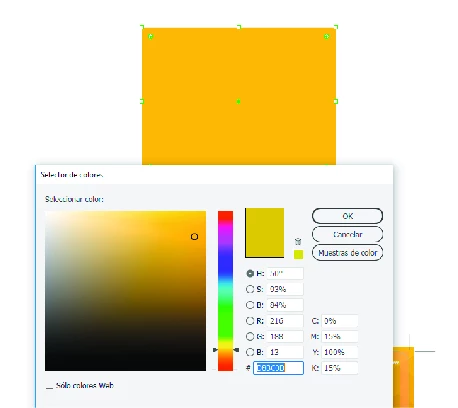
As you see, the color picker shows a different color, like a greenish orange.
The thing is, that when I pick this color and apply it to other figures, these figures get the color that the original art shows, not the color that the color picker shows.
So even though this doesn't actually affect my workflow, I'm afraid of what will happen when I send my work to print, will the colors be printed as the color picker shows me, or as I see them?
I've been working with this ICC profile and color space for a while, and didn't have this problem until 5 days ago
Help please!!
I'll appreciate anny comments on this,
Thanks!

 AdChoices