Participating Frequently
August 5, 2021
Question

Color Profile Does Not Match Error

  • August 5, 2021
  • 2 replies
  • 1346 views

Hi, all -

When I open a certain AI file I keep getting the message in the screenshot below. How do I find the conflict and resolve it? Thanks!
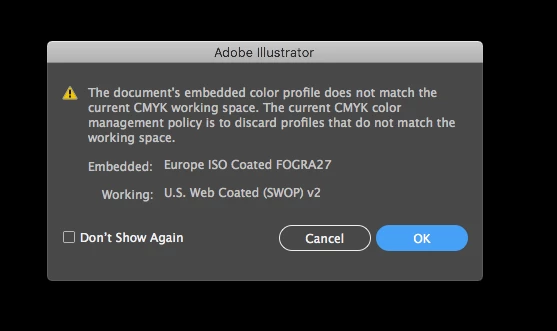

 

This topic has been closed for replies.

2 replies

Ton Frederiks
Community Expert
Community Expert
August 5, 2021

Did you turn on the checkboxes for Profile Mismatches in your Color Settings?

It should give you options when a mismatch occurs.

Participating Frequently
August 5, 2021

Hmm, just checked the boxes. Now it's asking me to choose a color profile and I don't know which to choose. And it's showing me errors, but not telling me which files are responsible...

Ton Frederiks
Community Expert
Community Expert
August 5, 2021

Can you show the warning?

Doug A Roberts
Community Expert
Community Expert
August 5, 2021

Do you want to discard the embedded profile in favour of the working space? Which colour profile do you need?

Participating Frequently
August 5, 2021

Doug, hi -

I assume I want to discard the embedded profile in favor of the working space, yes. How do I find which files have the European profile and convert them?

Doug A Roberts
Community Expert
Community Expert
August 5, 2021

You can see in a file's metadata in something like Bridge. Are you talking about many files or just this one?