Inspiring
May 20, 2021
Answered

Color swatch creation in adobe illustrator

  • May 20, 2021
  • 2 replies
  • 892 views

Please some one help me regarding creation of color swatches from Hex. color codes in Adobe Illustrator 2020.


Thanks a lot.

This topic has been closed for replies.
Correct answer John Mensinger

Start a new document, logically, using the "Web" document preset.

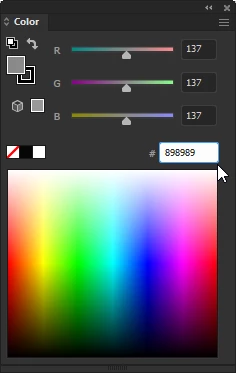
1. In the Color panel (Window > Color), type or paste the desired hexadecimal string into the # field and tap Enter.

2. Choose Create New Swatch... from the panel menu.


2 replies

John Mensinger
Community Expert
John MensingerCommunity ExpertCorrect answer
Community Expert
May 20, 2021

Start a new document, logically, using the "Web" document preset.

1. In the Color panel (Window > Color), type or paste the desired hexadecimal string into the # field and tap Enter.

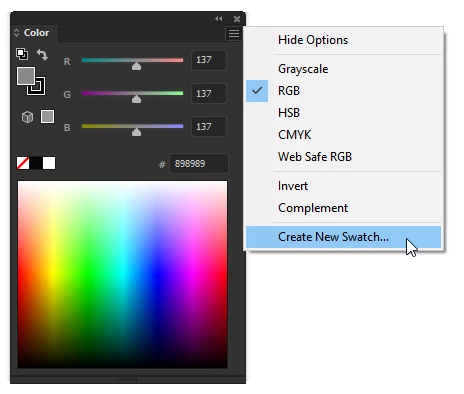
2. Choose Create New Swatch... from the panel menu.


Inspiring
May 20, 2021

Thanks, I will do that

KS
Ashutosh_Mishra
Inspiring
May 25, 2021

Hi there,


Thanks for reaching out. In addition to the correct response given by @John Mensinger, I'd suggest you to check out this web article(https://design.tutsplus.com/articles/the-ultimate-guide-to-adobe-illustrator-swatches--cms-33246) to know how you can work on swatches in Adobe Illustrator.


Regards,

Ashutosh

Kurt Gold
Community Expert
Community Expert
May 20, 2021

Please elaborate and explain exactly what you are going to do.


Inspiring
May 20, 2021

Dear KurtGold,


I am trying to create color swatches in AI 2020 for the code #FEEA2A and some other colors for creating my own color group. Please help.

KS