

Color values are incorrect in my Illustrator
Hello,
I have encountered this problem that my CMYK values in Illustrator (and Photoshop) are incorrect.
For example, I have made a logo and used these two colors in it, #F7931E and #1B1464. Then I created "logo usage guidelines" where I included color HEX codes, RGB, and CMYK values which were:
#F7931E; RGB: 247, 147, 30; CMYK: 0, 50, 99, 0
#1B1464; RGB: 27, 20, 100; CMYK: 100, 100, 26, 24
Then after some time, I received a message from a client that my provided CMYK values are incorrect and sent these two screenshots:
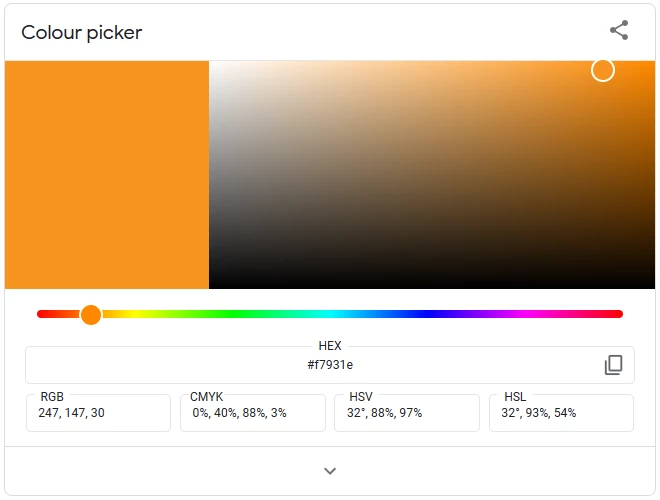
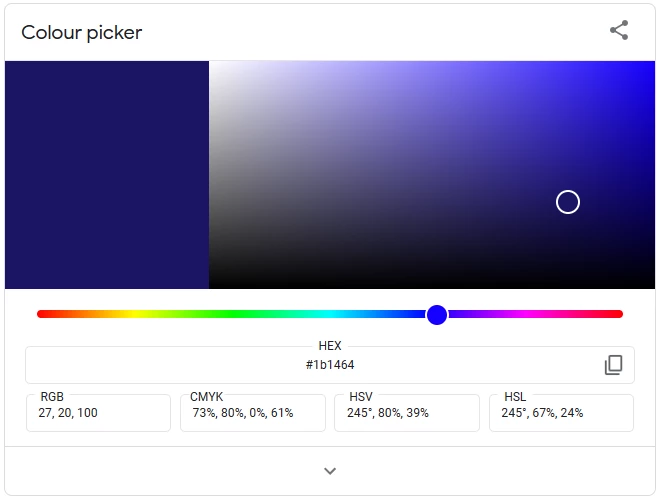
As you can see, my CMYK values are different from his screenshots
my 0, 50, 99, 0 = his 0, 40, 88, 3
my 100, 100, 26, 24 = his 73, 80, 0, 61
I thought that I f**ked up and somehow copied the wrong values... I opened Illustrator and my CMYK values were the same as those I provided to him...
Then I googled a bit and everywhere CMYK values were shown as my client sent me... I even found a formula for how CMYK values are generated from RGB values:
R = 247, G = 147, B = 30
C = 1 - (247 / 255) = 0.0314
M = 1 - (147 / 255) = 0.4235
Y = 1 - (30 / 255) = 0.8824
K = min(0.0314, 0.4235, 0.8824) = 0.0314
C = (0.0314 - 0.0314) / (1 - 0.0314) = 0
M = (0.4235 - 0.0314) / (1 - 0.0314) = 0.4048
Y = (0.8824 - 0.0314) / (1 - 0.0314) = 0.8784
CMYK: (0%, 40.48%, 87.84%, 3.14%); rounded (0%, 40%, 88%, 3%)
So I assume that there's something wrong with my Illustrator (and Photoshop) color settings and I am asking for your help.
 AdChoices