
juliec70436993
Participant
January 17, 2025
Question

Color warning notification - what does this mean?

  • January 17, 2025
  • 3 replies
  • 294 views

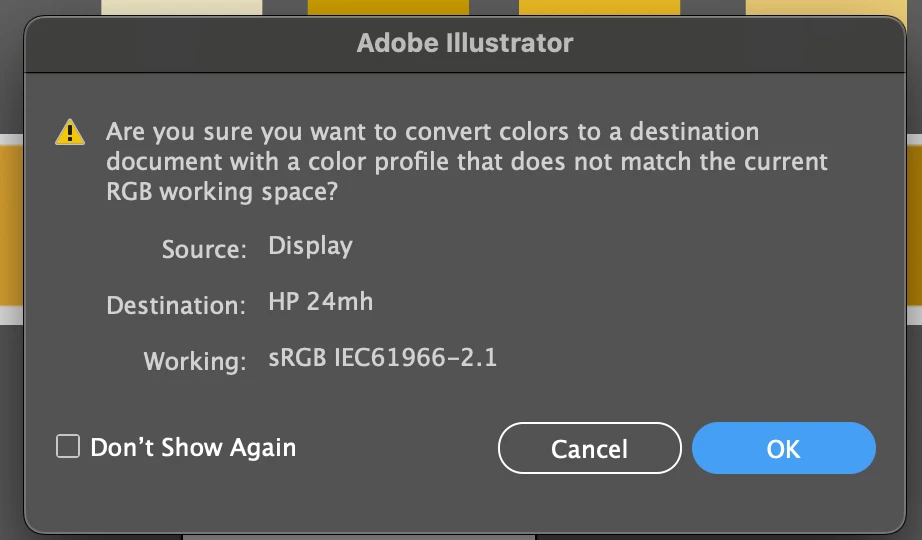
I am taking a vector that was built in RGB color mode and pasting it into a new document with RGB color mode applied. The color profile settings are also exactly the same between both files. Anyone know why would this alert would come up? 
 

3 replies

Conrad_C
Community Expert
Community Expert
January 17, 2025

Those Source and Destination profiles aren’t typical for an Illustrator file. They’re typical for screen shots, because both of those profile names (Display and HP 24mh) are default color profiles for different computer displays.


Were these Illustrator documents created on different computers, and in Illustrator on both computers, is Edit > Color Settings set to the Settings preset Monitor Color? Because that is one way that two Illustrator documents with the same Color Settings could have different embedded profiles. If both are set to Monitor Color, if the working space (that computer’s display profile) was assigned to the source document and the working space (of the current computer display) was assigned to the destination document you’re pasting into, that could set up this sort of color profile conflict.


If this is what happened, keep in mind that Monitor Color is not a recommended Settings preset today. As in Photoshop and other Adobe apps, Monitor Color is a throwback to over 20 years ago when color management didn’t exist and so color consistency was a mess. The only reason Adobe apps still offer Monitor Color is for legacy compatibility with very old files.


If you find that both computers were set to Monitor Color, set them to a preset that uses a currently standard RGB working space such as sRGB or Adobe RGB (1998). Or override the current preset by choosing one of those standard RGB working spaces.

Mike_Gondek10189183
Community Expert
Community Expert
January 17, 2025

The color settings need to be the same on both computers, not files. Otherwise you will be asked to convert, as shown.

Ton Frederiks
Community Expert
Community Expert
January 17, 2025

Did you check the Document Color Profile?

See if it is the same as in your color settings working profile.

Edit > Assign Profile...