
Participating Frequently
April 11, 2020
Answered

Coloring map using data file (CSV)

  • April 11, 2020
  • 2 replies
  • 2288 views

I'm seeking a scripting solution for using a data file (like Excel or CSV) to apply colors to a county map. I'm a scripting noob but usually understand enough to modify script I find for my purposes. And I have found a few scripts out there, including one here on this forum, but am struggling to apply it correctly.


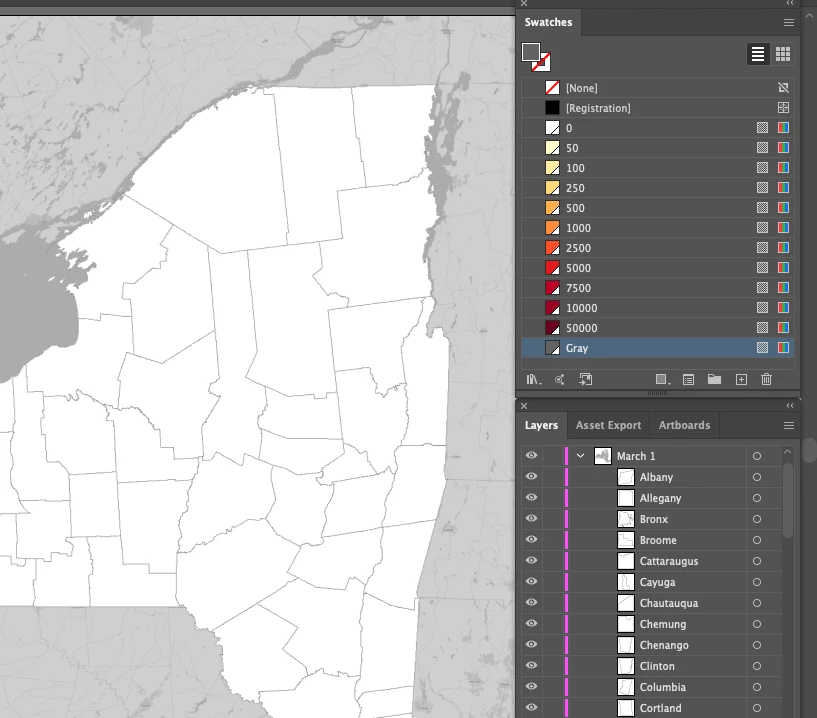
The particulars of my project: I have a map of NY state, with each county an object on a separate sublayer of a layer group; the layer group represents a date. I want to color the counties by the number of cases of coronavirus on that date. Eventually there will be 40 more layer groups — one for each day since the outbreak started — and they'll be imported into Premiere to create a timeline video of the spread.


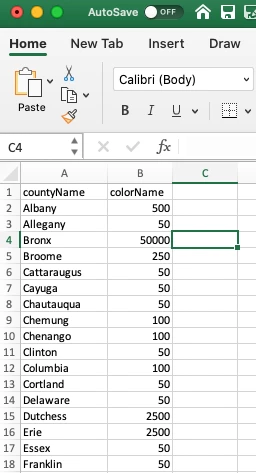
My CSV file has the name of the county and name of a color, which aligns to a color name in my palette. I also have the number of positives cases on that date and also want to pull that text into a text box on top of the county. I haven't gotten that far yet — still trying to solve for coloring the counties.


Here are a couple of screenshots that I hope explain what I'm trying to do. I appreciate any help the community can offer!
 

This topic has been closed for replies.
Correct answer renél80416020

Thank you again, René! We are getting closer. Your script confirmed what I thought might be the problem — some of the counties are compound paths. I found script here that appears to fill compound path items, but I'm unsure how I would incorporate it into your original script: https://community.adobe.com/t5/illustrator/setting-fill-color-for-a-compound-path-via-script/td-p/10968073?page=1


Again, many thanks for your assitance!


Bonjour,

Je n'ai pas besoin de modèle, voilà la fonction applyColorSettingsRow complète à remplacer:
//-----------------------------

function applyColorSettingsRow(layerName,regionName, colorName){
var doc = app.activeDocument, thisRegionShape, thisColor;
try{
thisRegionShape = doc.layers[layerName].pageItems.getByName(regionName);
thisColor = doc.swatches.getByName(colorName);
if (thisRegionShape.typename == "CompoundPathItem") {
thisRegionShape.pathItems[0].fillColor = thisColor.color;
}
else {
thisRegionShape.fillColor = thisColor.color;
}
} catch(e) {
alert("Region: " + regionName + "\tColor: " + colorName + "\r" + e + "\n\n");
}
}

//----------------------

Pour la suite donne une copie d'écran pour préciser ce que tu veux faire...

René


2 replies

renél80416020
Inspiring
April 12, 2020

Bonjour,

Si je peux me permettre et si j'ai bien compris:

#target illustrator
function test(){
var layerName = "March 2";
layerName = prompt(" layerName ?",layerName);
function readSemicolonCSV(filePath){
var f = File(filePath);
if(!f.exists){
alert(f + " is not found.");
return false;
}
var str = "";
f.open("r");
str = f.read();
f.close();
return str;
}
function getCells(str){
var rows = str.split(/[\n\r]/g);
for(var i=0; i<rows.length; i++){
rows[i] = rows[i].split(/;/g);
};
return rows;
}
function applyColorSettingsRow(layerName,regionName, colorName){
var doc = app.activeDocument, thisRegionShape, thisColor;
try{
thisRegionShape = doc.layers[layerName].pathItems.getByName(regionName);
thisColor = doc.swatches.getByName(colorName);
thisRegionShape.fillColor = thisColor.color;
} catch(e) {
alert("Region: " + regionName + "\tColor: " + colorName + "\r" + e + "\n\n");
}
}
if(app.documents.length == 0){
alert("No open documents detected.");
return;
}
var csvFile = File.openDialog("Open CSV File", "*.csv");
if(!csvFile){
alert("No file chosen");
return;
}
var data = getCells(readSemicolonCSV(csvFile));
var doc = app.activeDocument;
for(var i=1; i<data.length; i++){
applyColorSettingsRow(layerName,data[i][0], data[i][1]);
};
};
test();


mduprasAuthor
Participating Frequently
April 12, 2020

Thank you, René! This is working almost perfectly. I'm running into one problem I'm not able to resolve. There are 62 counties in my list. For 25 of them, I get an error message: "No such element." It's the same 25 counties each time, but I can't figure out what is problematic with those particular rows in my CSV file. I've double-checked the spelling several times, and even tried renaming all the counties in the sublayers to numbers. I still get the error on the same counties every time.


Any ideas on what could be causing this? I'm happy to send you files if that would help. I greatly appreciate your time and help!

renél80416020
Inspiring
April 12, 2020

Rebonjour,

Je veux bien contribuer à trouver la source d'erreur, mais il me faut un fichier ai pour la version CS6

impérativement et bien sur le fichier texte csv.

René


CarlosCanto
Community Expert
Community Expert
April 12, 2020

nice project, this should get you started. Use the script here, and post back with questions when you get stuck.


https://community.adobe.com/t5/illustrator/coloring-map-from-data-sheet-like-excel/td-p/8628353?page=1

mduprasAuthor
Participating Frequently
April 12, 2020

Thanks, Carlos — I did attempt that script but kept running into an error message. I posted about it at the bottom of the thread.