Participant
March 28, 2021
Answered

Colors don't match

  • March 28, 2021
  • 1 reply
  • 3280 views

Hello!


My colors don't match. It's funny - actually frustrating - but since the last update, my computer has been turning the GPU mode by itself and the colors were very washed out. Then I turned it off, but I still don't know if the colors are right...


Number 1: illustrator

number 2: exported PNG

number 3: screenshot of illustrator.
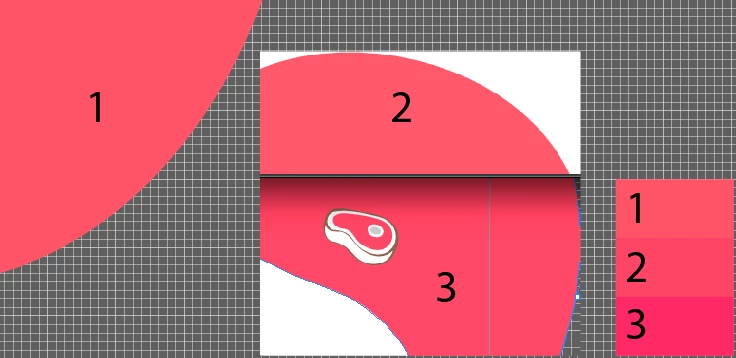
ALL OF THEM has different code numbers.


P.S: my monitor are all calibrated to the same light condition.


This topic has been closed for replies.
Correct answer Ton Frederiks

See above:

Check your Color settings.

There is a bug caused by the recent Photoshop update. It sets your Color Settings to Emulate Illustrator 6, which turns color management off.

If that is the case, use the CC app to revert Photoshop to the Previous version (22.2.0) and then change your Color Settings to what you want it to be.

UPDATE: an update to Photoshop 22.3.1 solves the problem.

1 reply

Ton Frederiks
Community Expert
Community Expert
March 28, 2021

Check your Color settings.

There is a bug caused by the recent Photoshop update. It sets your Color Settings to Emulate Illustrator 6, which turns color management off.

If that is the case, use the CC app to revert Photoshop to the Previous version (22.2.0) and then change your Color Settings to what you want it to be.

HROD_Author
Participant
March 29, 2021

After some hours with Adobe Support trying to fix the colors profiles, I had to return to Illustrator and Photoshop 2020, and it helped.


Thanks anyway (=