
Participant
May 6, 2020
Answered

colors dull in illustrator 2020

  • May 6, 2020
  • 6 replies
  • 76460 views

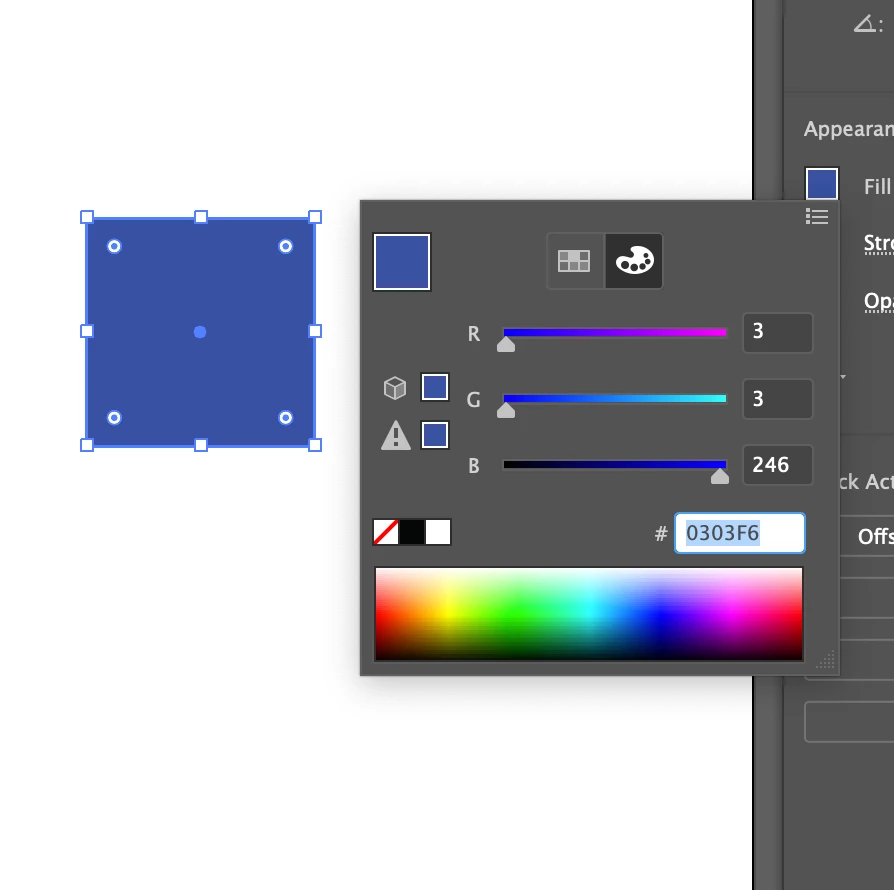
All of my colors in Illustrator are super dull for some reason. One of my favorite colors is this bright royal blue (0303F6), but when I try to use it in Illustrator, it comes out muted and just plain sad. It does this with every other color I use, too. I'll attach some pictures below.


I'm fairly new to Illustrator, so I have little to no clue what I'm doing. Advice would be greatly appreciated.


Thanks!


Here's the color I want:

 

And here's Illustrator's take on it:
 

Correct answer Ton Frederiks

Or start with an RGB document.

Don't use a Print preset but an Art & Illustration preset to create a new document.

6 replies

Participant
September 21, 2022

Thanks. I helped.

Inspiring
March 15, 2021

this does not work. I just created a new RGB document in illustrator 2020 and the colors are still muted.


Ton Frederiks
Community Expert
Community Expert
March 15, 2021

Can you create a new topic and describe what you did and expect?

Inspiring
March 16, 2021

I discovered the problem. I am using dual monitors with my computer which involve aa apple PowerBook pro and a Dell 48" monitor. If i look at the illustrator color on the Dell screen it is muted. If i pull the workspace over to the PowerBook screen the color is exactly what its supposed to be. So, it is the Dell monitor causing my problem. I will call Dell to see if there is a better way to calibrate their monitor.

Jacob Bugge
Community Expert
Community Expert
May 6, 2020

For my part you are welcome, eturk.


Ton Frederiks
Community Expert
Ton FrederiksCommunity ExpertCorrect answer
Community Expert
May 6, 2020

Or start with an RGB document.

Don't use a Print preset but an Art & Illustration preset to create a new document.

eturk24Author
Participant
May 6, 2020

Thanks so much! Super easy fix and I can't believe how quickly people responded.

Charu Rajput
Community Expert
Community Expert
May 6, 2020

Hi,
Please share your color settings from Edit -> Color Settings... Please refer the below screenshot for the same.


Also, you can refer below post

https://community.adobe.com/t5/illustrator/colors-dull-in-illustrator-2020/m-p/11110386?page=1#U11110386


I hope this helps you

Thanks


Best regards
Participant
March 22, 2021

Thank you so much! 

Jacob Bugge
Community Expert
Community Expert
May 6, 2020

eturk,


First guess: you are in CMYK Color Mode; you can create/switch a/the document in(to) RGB Color Mode and start over.