


Colors in Nested Layers Become Oversaturated on Export to JPEG
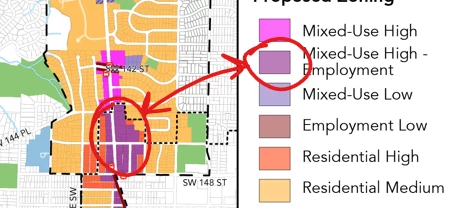
I use illustrator to make maps for work. I like to use layer styles so I can move objects (parcels) in and out of zoning categories without the parcels having any appearance settings themselves. For the past while I've been running into the problem that opacity settings that are applied to nested layers don't work. As in I've got a zoning layer that's set to 60% opacity, and then a sublayer with a color, and then objects within that layer with no set appearance. When I export to JPEG, the opacity for these shapes ends up well over 60% but not quite at 100% either. However if I have just an object in a layer set to 60% it comes out fine.
In the example jpeg export below, the two circled colors should be the same.
If I place the illustrator files in InDesign I don't run into this problem, so that is my usual workaround, but it adds several steps.
Illustrator is set to RGB mode. Opacity is Normal 60%.
I'd like to be able to use layers and sublayers to stack effects and have things look consistent when I export from Illustrator! Can you help?
 AdChoices