Participant
October 31, 2023
Question

colour changes

  • October 31, 2023
  • 1 reply
  • 84 views

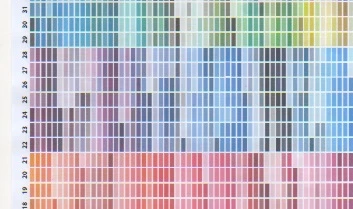
I created an A4 colour chart which I printed on normal paper to use for colour matching basic printing as my screen is not calibrated

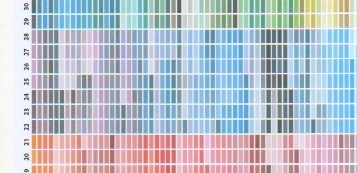
Recently the blues and magentas in particular were not matching so I reprinted my chart and now the blues and magentas are all washed out. I dont remember changing any settings, I am still using the same printer and paper so why have the colours changed?

below are the examples, the top image shows a recent print, the bottom image is the original print

they have only been printed about a month apart
This topic has been closed for replies.

1 reply

Monika Gause
Community Expert
Community Expert
October 31, 2023

If you screen is not calibrated then how can you know which one is correct?

Did you change the color management? in the system, in Illustrator/Birdge or when printing?

Activate some color correction in the printer driver?

Participant
October 31, 2023

Thank you for your reply. It doesnt matter to me which is correct, I am just using the chart to show me what the colours on my screen actually print out as. so I can select a colour square on my printed chart and then use that colour in illustrator and know how it will appear in print.  I am just frustrated that I can no longer print a dark blue or magenta when I could a month or so ago. I have not changed any settings. I am starting to suspect a printer issue rather than any issue with illustrator but just wondered if anyone else had ever experienced similar.