
Andromeda#JPOK1000
Participating Frequently
December 1, 2022
Question

Colour setting, flatten image, & magic eraser tool.

  • December 1, 2022
  • 2 replies
  • 378 views

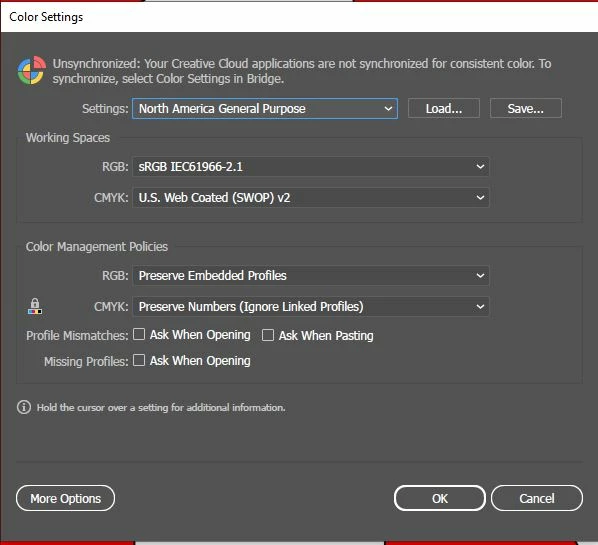
Hi all, now just bare with me on this one as I have more than one question about the settings in AI. Firstly is there a setting in which you can flatten your entire image after selecting all your layers just like you can in Photoshop? Also, does AI have a magic erasure tool like Photoshop? And lastly what colour setting should I have selected in my colour settings? At the moment they are on the settings that the program comes with as displayed in the image attached. However, is it worth changing them & what are the benefits? And yes you've guessed it I'm an AI virgin 
This topic has been closed for replies.

2 replies

Mylenium
Legend
December 1, 2022

Changing color settings only makes sense if you are actually using color management - monitor calibration and all that included - and making informed decisions about the required output for print or otherwise. Leave the defaults if you haven't educated yourself on these matters. There's entire sections in the AI and PS online help on this. Flattening is object-based and AI will rasterize whatever you have selected. There is no magic eraser nor would it particular make sense for a program that is not meant to be a photo editor. Anyway, please do read the help. You have several fundamental misunderstandings and gaps in your knowledge and that's only going to frustrate you when you don't know how even some basic things work.


Mylenium 

Monika Gause
Community Expert
Community Expert
December 1, 2022

As for the color settings, please learn color management. It's a necessity that you learn it.

If you tell us what you want to create and how it will be produced, we might give you some tips for settings, but nevertheless: you have to learn it.


Flattening your image doesn't make a lot of sense with colored vector artwork. Vector artwork will always be editable to some extent.


A magic eraure tool is not necessary since images are not flattened. Selecting works differently. You might want to work through the documentation. https://helpx.adobe.com/illustrator/user-guide.html