Participant
February 16, 2018
Answered

Colours change on pasting from Illustrator to indesign

  • February 16, 2018
  • 4 replies
  • 5147 views

Pasting a block of CYAN from CC illustrator into CC Indesign and it changes it from 100%C to 71%C13%M.
Both programs are running same CMYK colour profile.

This never happened in CS6. Any ideas appreciated as i have spent over 10 hrs trying to sort this out.

This happens to all colours pasted. They seem to take on an RGB profile or similar and then covert back to CMYK on paste? I have no idea.
This topic has been closed for replies.
Correct answer Ton Frederiks

Thanks Ton, didn't know that was there, but both are same profiles and as per original post the CMYK breakdowns show the colour different. Thats the issue.
"Pasting a block of CYAN (100%C) from CC illustrator into CC Indesign and it changes to 71%C13%M."


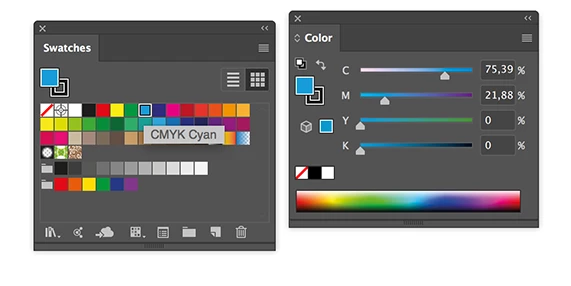
I was asking for the percentages because just selecting the CMYK Cyan Swatch may give you a surprise when the document started as CMYK, was Converted to RGB and back again to CMYK. The name of the swatch does not change, but the percentages do.

4 replies

emilyd32594013
Participant
February 16, 2018

I have a similar issue where my colors are spec'd PMS in AI and then save them as EPS files. When I place the EPS file into ID or even copy and paste the image from AI to ID the colors are immediately converted to CMYK and loose all of the PMS info. It's been happening for about 6 months and I can't figure out a solution.

Monika Gause
Community Expert
Community Expert
February 16, 2018

emilyd32594013  schrieb

I have a similar issue where my colors are spec'd PMS in AI and then save them as EPS files. When I place the EPS file into ID or even copy and paste the image from AI to ID the colors are immediately converted to CMYK and loose all of the PMS info. It's been happening for about 6 months and I can't figure out a solution.

Please create a new thread.

Please post which version you are using, which system, which color managmeent setup

Please show us before and after

Which Pantone swatches exactly?

Bill Silbert
Community Expert
Community Expert
February 16, 2018

I tried to duplicate your problem, working on a Macintosh with Sierra operating system, but did not have your results. The Cyan pasted from CC Illustrator to CC InDesign without any change in color. Have you checked to see that your Color Settings found under the Edit Menu in both programs are set identically? I know that when my work machine was first updated to Sierra and CC 2018 I was having similar problems between Photoshop and InDesign but once I made sure that all of the color settings matched between programs I no longer had a problem.

Monika Gause
Community Expert
Community Expert
February 16, 2018

Is your color management synchronized between the applications? This looks like a CMYK to CMYK conversion takes place.

jezzabrisAuthor
Participant
February 16, 2018

Yes Bridge takes care of that. But i think you are right. Its a doc created in CS6 and reworked in CC. Seems the settings are being held in the doc even though the new colour settings should overide.

Ton Frederiks
Community Expert
Community Expert
February 16, 2018

Are you sure that your Illustrator document is in CMYK Document Color Mode?

jezzabrisAuthor
Participant
February 16, 2018

Yes all docs CMYK. All docs same colour settings. Using Bridge

Ton Frederiks
Community Expert
Community Expert
February 16, 2018

You can check if your document profile is the same as your color settings.

Also check, if you are using a Cyan swatch what your Color panel shows for percentages.