Known Participant
March 16, 2020
Question

Colours have gone muddy/dulled

  • March 16, 2020
  • 1 reply
  • 285 views

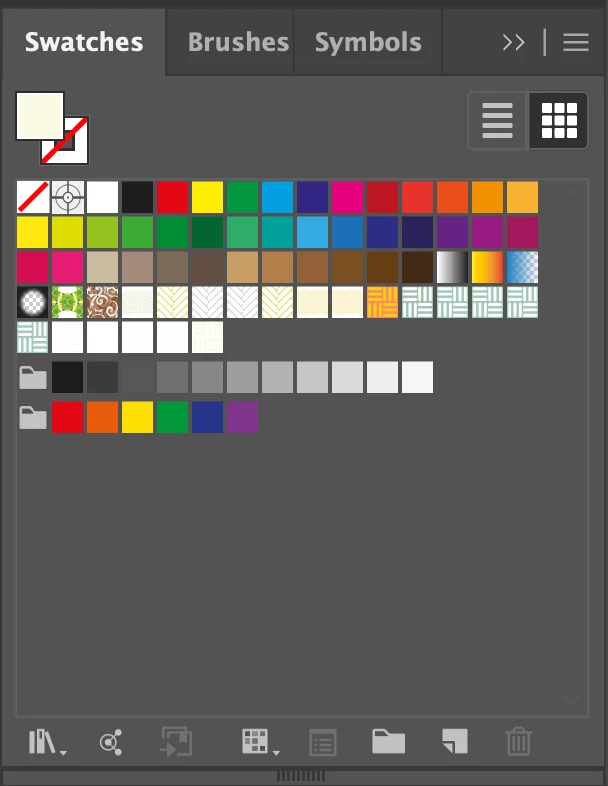
What could cause this: 


To look like this: 
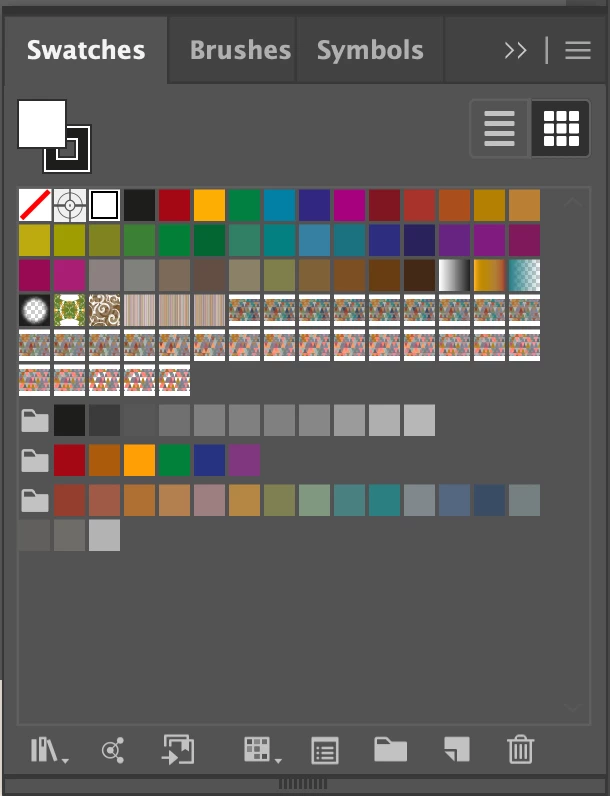
 

Please note there is a drastic change to the colours in the swatch. These colours have dulled somewhat/ looks muddy. I was working on a file. Left it for a few hours with my computer on sleep. When I came back the colours in the swatch and the colours in my artwork all looked dulled and muddy. Does anyone have a fix for this? Thanks in advance. 

    This topic has been closed for replies.

    1 reply

    Mylenium
    Legend
    March 16, 2020

    Well, have you actually restarted your computer? Aside from that it's probably the same old answer: You have issues with your monitor color profiles and settings. Suspending the computer probably didn't re-initialize the profiles correctly and/ or simply bombed out some required hardware acceleration feature on your graphics hardware. In any case, yopu have to investigate.


    Mylenium

    jhannelAuthor
    Known Participant
    March 16, 2020

    Thanks for the reply. I checked colour setting of document and monitor before restarting. All seemed normal. After restarting the issue was not resolved. This has actually happened to me twice before. The first two times was on a windows laptop. I've since upgraded to a Mac and this is the first time this has happened on my Mac (but third time overall). I did notice this message when I reopened the file in Illustrator: 


    As I said the colour settings appear fine but I still get the warning above. How can there be an issue if the working space and the embedded profile are exactly the same? Would love your two cents. Thanks again.