


Participating Frequently
August 17, 2026
Question

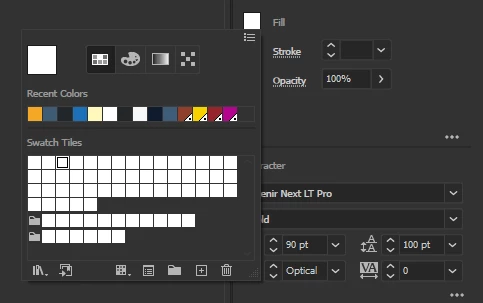
Colours in the Swatches go all white, many times while working.
  • August 17, 2026
  • 1 reply
  • 20 views

This was random at times, now its becoming a very consistent thing is Illustrator, when I have colours set for a project and open this swatches window this is what I greeted by. What is actually happening, from files not saving properly to this… I am forced to restart Illustrator many times because of this (I know i can set a colour palette above the project to make it easier but this is how I work).

    1 reply

    Abhishek Rao
    Community Manager
    Community Manager
    August 17, 2026

    Hi @Jiltedone,


    Thanks for reaching out, and I’m sorry for the frustrating experience with the Swatches panel.

    Could you please confirm your exact Illustrator version and OS version? As a quick test, switch to View > Preview on CPU or temporarily disable GPU Performance under Preferences > Performance, and check whether the swatches still turn white.

    If the issue persists, please back up and reset your Illustrator preferences, then test again. Adobe provides the steps here:
    https://adobe.ly/4bP1doO (https://adobe.ly/3U37x5V)

    Please let me know how it goes.


    Thanks,
    Abhishek