


Participant
July 21, 2026
Question

Colours loaded from colour guide palette completely different
  • July 21, 2026
  • 1 reply
  • 15 views

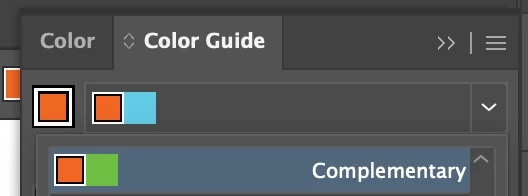
When I select any colour from the colour guide palette, for example a complimentary colour, the swatches loaded in the top window are completely different. This started happening over night and I’m stumped. I use the colour guide a lot for building brand colour palettes. See the example in the screen grab. I’m looking for a green that compliments the orange, but when I click on the complimentary green, it loads a blue in the top bar?

It’s the same for every palette in the guide and for every colour I start with.


    1 reply

    Abhishek Rao
    Community Manager
    Community Manager
    July 21, 2026

    Hi ​@harry_1488,


    I'm sorry you're running into this. I can see how confusing it would be when the Color Guide starts suggesting completely different colors than the ones you select.

    To help narrow this down, could you please let us know your Illustrator version and operating system version? I'd also recommend starting with a manual Illustrator preferences reset by following this guide: https://helpx.adobe.com/illustrator/kb/troubleshoot-preference-issues.html. After that, please check whether the issue occurs in both RGB and CMYK documents (File > Document Color Mode) and whether it also happens in a brand-new Illustrator document using a default color. If possible, please share a short screen recording showing you selecting the base color, choosing a harmony rule, clicking the expected swatch, and the incorrect color being loaded. That will help us investigate this further.


    Looking forward to your update.

    Abhishek