neap63661587
Participant
November 27, 2016
Question

Combining different graph types not working for me in CC

  • November 27, 2016
  • 1 reply
  • 489 views

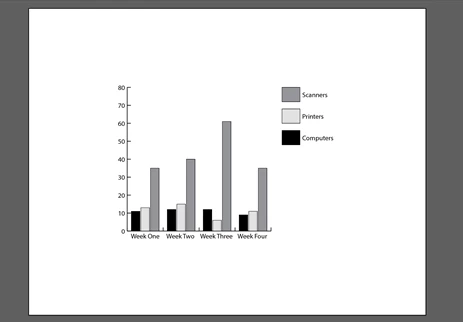
I've been trying to use information from my column graph to create a line graph on top. I followed the instructions here: Combining different graph types  and here:   How to create graphs in Illustrator

I have tried use the group selection tool and clicking the legend and when I selected line graph, most of the information disappears. I feel like an idiot. I'm trying to select the scanners group, hen apply the line graph type.
    This topic has been closed for replies.

    1 reply

    Monika Gause
    Community Expert
    Community Expert
    November 27, 2016

    Should work.

    So your workflow might be wrong.

    What are you doing step by step?

    neap63661587
    Participant
    November 27, 2016

    I click on the column graph, set the width and height. I then in put the data like this:

         Computers    Printers    Scanners   

    Week One    11    13    35   

    Week Two     12    15    40   

    Week Three     12    6    61   

    Week Four     9    11    35   


    To add the line graph, I used the group selection tool and select scanners, click line graph and okay..

    Monika Gause
    Community Expert
    Community Expert
    November 27, 2016

    You need to convert it to line graph via Object > Graph > Type