
Inspiring
October 6, 2017
Answered

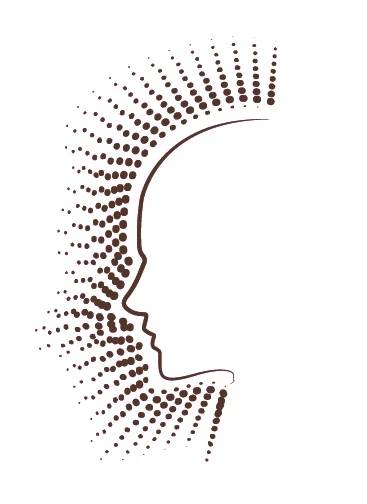
Complicated dots run around shape

  • October 6, 2017
  • 3 replies
  • 831 views

I am trying to recreate this outer dot pattern for new artwork as I feel this one is a bit messy.

I have tried creating a pattern and brush so each line of dots is one object then blending or applying to the path.

But I cant even get close.

Can anyone help please?

Thank you rob
    This topic has been closed for replies.
    Correct answer rob_theo_UK

    Thanks Mike I will try that it looks good

    cheers rob

    3 replies

    Mike_Gondek10189183
    Community Expert
    Community Expert
    October 9, 2017

    You can try a scatter brush. Below si the quiche entitle result showing some of the challenges.

    For the middle picture I used simplify and a couple passes with smooth tool  got me closer. Then expanded and did manual rotations, but did not spend a lot of time as you get the idea I hope. The grouping was very as I needed after expanding and the spacing was equal, so expanding is working well. You just need to option click with rotation tool to set center of rotation, and then rotate.

    rob_theo_UKAuthorCorrect answer
    Inspiring
    October 9, 2017

    Thanks Mike I will try that it looks good

    cheers rob

    Mike_Gondek10189183
    Community Expert
    Community Expert
    October 9, 2017

    For my part you are welcome.

    When you apply the scatter brush the items will be centered on the shape. Double click on the scatter brush to edit, turn on preview, and change the scatter value so the edge lines up with the face.

    God save the queen.

    Ray Yorkshire
    Participating Frequently
    October 6, 2017

    You could use Astute Graphic's  wonderful free plugin Subscribe, which has a tool-

    Line perpendicular from path which creates a perpendicular from the chosen location of the existing path

    SubScribe - Astute Graphics

    14 precision vector tools for free ñmdash; SubScribe overview

    above example from here

    Explore all that SubScribe has to offer and it's FREE! - Astute Graphics

    Then make  a brush with circles and apply it to that path, roughly like this

    But when you come to the nose, mouth etc the perpendicular lines will start crossing  each other and looking a right mess.

    So Monika halftone idea is probably the best solution

    Monika Gause
    Community Expert
    Community Expert
    October 6, 2017

    Not sure what you expect exactly.

    Like this:

    Couple of strokes with dotted lines

    Or like this (Halftone effect)

    Inspiring
    October 9, 2017

    Thanks Monika/Ray

    The halftone Monika suggested is close but still not good enough for what I want.

    Ray that plugin looks great and if this would work correctly it would give the idea Iam trying to achieve,

    but I completely agree about the dots crossing.

    thanks for your help