Known Participant
June 17, 2020
Question

Compound path and Group bounding box issues

  • June 17, 2020
  • 2 replies
  • 1189 views

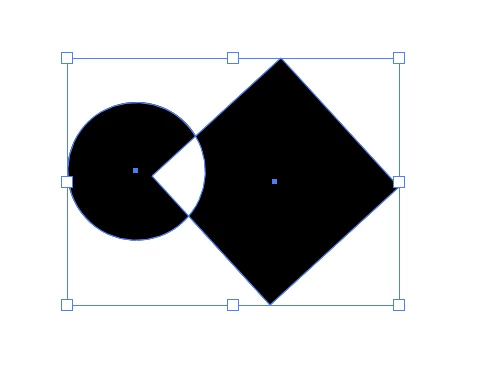
Generally speaking bounding box of any compound path composed from any number of shapes or freehand paths (even just one) being rotated with Rotate Tool automatically resetting. If compound path constructed of basic shapes only (ellipses, rectangles, etc) and rotation is applied by dragging on a corner rotation widget bounding box behaves normally (aligned with rotaton). 
First picture — bounding box aligned as it supposed to, second — automatically reset after rotation. 
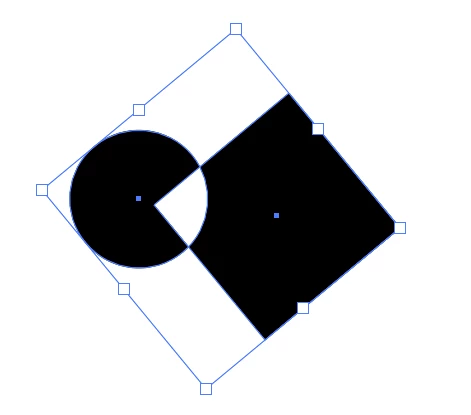

Almost the same with group bounding box with one big difference — bounding box of a group containing any number of basic shapes stays aligned with the group (no matter if i rotate it with Rotation Tool or by the corner rotation widget dragging). When group contains any freehand path any kind of rotation automatically resets its bounding box.  

This topic has been closed for replies.

2 replies

tromboniator
Community Expert
Community Expert
June 18, 2020

I am not finding a difference in behavior between paths generated by the shape tools and those built in other ways.

What I do find is that the orientation of the bounding box of a rotated group or compound path depends on whether or not any or all of the individual paths have been rotated before grouping or compounding. It seems that a group's bounding box will rotate with the group as long as the bounding boxes of the component paths are in the same orientation; otherwise it will align to the grid. The bounding box of a compound path will only rotate with the compound if the bounding boxes of the component paths are oriented to the grid as they were when they were generated. In other words, 0° rotation. 90° or 180° will not work.


Peter


Edit: The orientation of the bounding box can, of course, be reset with Object menu > Transform > Reset Bounding Box, but if the paths are still Shapes (such as those generated by the Rectangle Tool, and otherwise unmodified) it is necessary to go to Object > Shape > Expand Shape to be able to reset the bounding box.

Doug A Roberts
Community Expert
Community Expert
June 18, 2020

Hi, that's not what I'm seeing:

What version of Illustrator are you using?

Known Participant
June 25, 2020

Doug, it's latest Illustrator (24.2) but the problem persists for a while (can't actually remember the first time i encounter it, maybe after basic shapes were introduced as a concept). 

I did it again just now, step by step: pen tool, draw a path freehand, draw second path freehand, selected both paths with Selection tool (shortcut V), made compound path (shortcut cmd-8), select Rotate tool (shortcut R), rotate random angle, select again with Selection tool — bounding box looks as if it been reset. 

If i rotate this compound path not with Rotation tool (R) by dragging on the corner (that with little arched arrow modificator) boudning box will look aligned with rotation, as it supposed to. 


But if i use Rotaton tool after that even once bounding box will be immediately and permanently reset.

Doug A Roberts
Community Expert
Community Expert
June 26, 2020

Sorry, I missed the Rotate tool part. I see what you mean. I'm not sure why the behaviour should be different for the rotate tool vs. bounding box. Have you posted this to https://illustrator.uservoice.com/ ?