Participant
December 4, 2017
Answered

Convert from .psd to .ai (and make file editable)

  • December 4, 2017
  • 1 reply
  • 5780 views

Hello guys,

I have web design file in psd format with tons of layers and etc.. But every time I try to convert it to .ai format -  shows only image.

What I have tried
Open psd file in illustrator.
Save psd file as eps

tried to place psd file into illustrator with "convert objects to layers checked"

And every time I get the same (only image)

Maybe you guys know other ways? Thanks

This topic has been closed for replies.
Correct answer Monika Gause


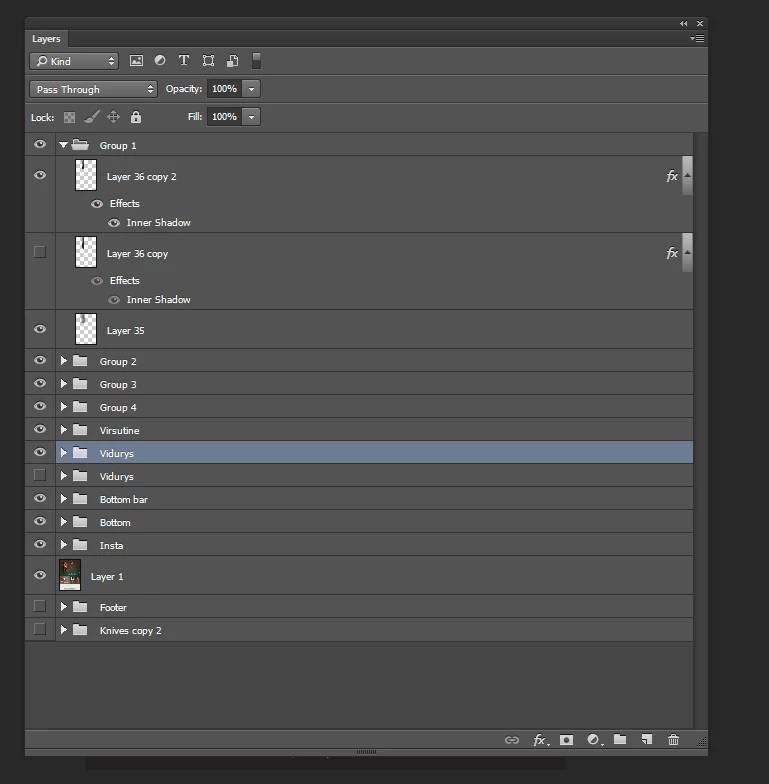
You have applied effects to your layers.

And you have applied blending modes to layer groups.

Illustrator doesn't understand this.

1 reply

sharp_hands16B8
Community Expert
Community Expert
December 4, 2017

When you say editable, images that are raster based will stay pixel based and won't be editable inside of Illustrator. Unless you were trying to vector trace them.

Text layers, and alike, should be able to transfer over and remain editable.

What sort of elements are you hoping to edit or what is the gain of moving over to Illustrator? This may be a workflow issue rather than a technical issue.

Participant
December 4, 2017

Gain of moving over to illustrator - I'm designing websites in illustrator... But all the time was doing that from the very beginning of process. Now I got the project where I need to make huge changes in psd web design file... I want to transfer this file to illustrator ( way more easy to work with illlustrator than photoshop for me )

I dont need advanced editability like change shadow and etc... I just want to move elements around, change image height / width , edit text and other fundamental stuff.

Participant
December 5, 2017

You need to set them to Normal blending mode.


This is what did you mean? I'm changed, and nothing happened.

However... I'm tried to delete all the photoshop effects, and it worked! Right now just need to figure out which one or few effects
doing this to me

Maybe have any idea?