
Participant
September 26, 2023
Question

Convert outline stroke to single line

  • September 26, 2023
  • 2 replies
  • 2845 views

I need to take an image where the strokes outline the lines when filled and convert them into a single line.  The end result is that I would like the lines to be a certain thickness (1/32") so that I can use this for stained glass.


Here is a portion of the source:
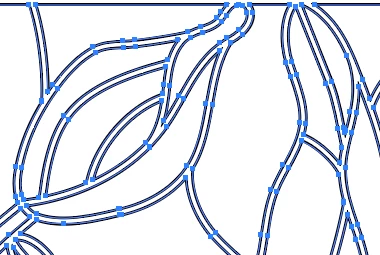
 

I want to have the lines shown in the below image to be of a certain size.   Shown below is an gross  example (rasterized) of what I'd like have, but with slimer (1/32") lines.   I want to keep the vector representation of course so that I can resize to the desired size while keeping the lines that same width.
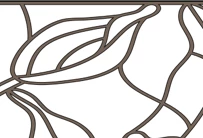


To be precise, I'd like to take the original image and convert the two strokes that outline the shape into a single stroke at the midpoint between the outline strokes.


How would I go about doing this.  It doesn't have to be precisely the midpoint.


This topic has been closed for replies.

2 replies

Jacob Bugge
Community Expert
Community Expert
September 26, 2023

Vince,


The real somution would be to squeeze the source of the source out of whoever made it, asking to get the original stroked paths from before their strokes were oulined, which the creator ought to have a backup of, and then work with that.


But I have a hunch that you could be lucky with the (latest version of) Stroker made by Kurt.


What say you, Kurt? @Kurt Gold 


Kurt Gold
Community Expert
Community Expert
September 26, 2023

The Stroker action is currently a sleeping horse, Jacob. There may be just too many exceptions, such that the action is only robust enough if certain conditions are present.


Anyway, as far as I understand, vincev is looking for a different animal that somehow should create strokes inside the region of circumjacent stroked paths. The Stroker action does not do that at the moment. It could be a delightful challenge to create something, though.


Ares Hovhannesyan
Community Expert
Community Expert
September 26, 2023

What if we will use live paint and expand? Or not?

Monika Gause
Community Expert
Community Expert
September 26, 2023

With this kind of artwork you can safely forget about it.

You might want to just gop ahead and draw the lines manually.


Using Object > Path > Offset path doesn't help you with controlling the line thickness?