

Chris  P.  Bacon
Inspiring
December 28, 2022
Question

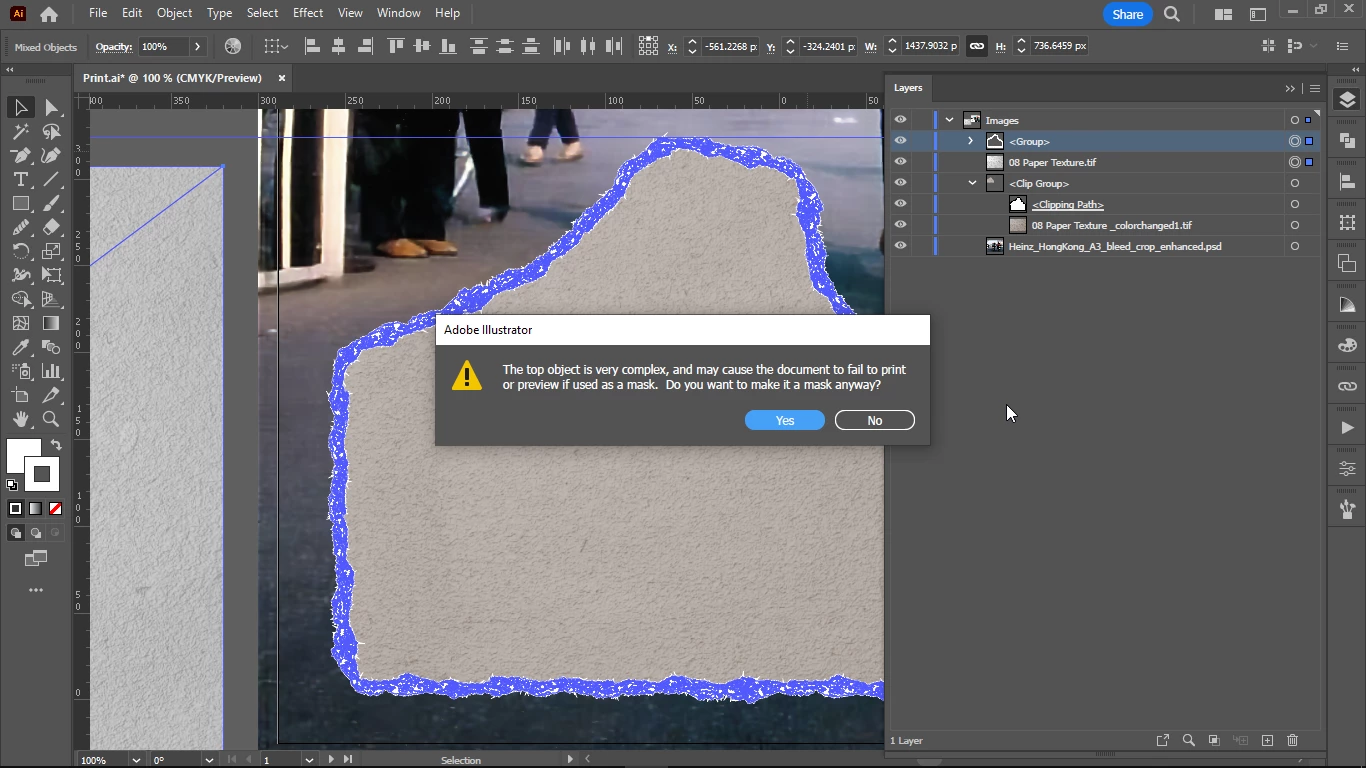
Convert pattern brush stroke outline into clipping path
  • December 28, 2022
  • 2 replies
  • 680 views

I wanted to make a clipping mask to replace my white torn paper stroke color with the white paper texture (linked, not embedded) but I get this warning, and indeed the stroke will disappear if I click Yes.

Does the method described in this video work also for pattern brush strokes?

how to put photos inside the outline or border of a shape or stroke of text in Illustrator - YouTube

Otherwise can I use this method?

How to Insert an Image Into a Shape in Illustrator 2022 - YouTube


This topic has been closed for replies.

2 replies

Ton Frederiks
Community Expert
Community Expert
December 28, 2022

Like the warning said, it is very complex and it will still be very complex with whatever method you choose to make a clipping mask.

Chris  P.  Bacon
Inspiring
December 28, 2022

What about selecting it or outline it by color, how accurately can Illustrator do that?

And then simply make the selection a clipping mask?

How would I do that?

Monika Gause
Community Expert
Community Expert
December 28, 2022

After expanding it would probably make sense to hit "Unite" on the pathfinder panel. Then use it as a clipping mask.

Chris  P.  Bacon
Inspiring
December 28, 2022

It worked like a charm .