Participant
March 22, 2023
Answered

Convert text into single dashed line

  • March 22, 2023
  • 3 replies
  • 3432 views

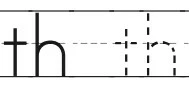
Peace be upon you, All. I design a kid's phonics practice book. Here I need to change the text to a single dashed line. How can I do this easily? I try stroke>dhashed line, but it gives me a rounded dashed text. 
This topic has been closed for replies.
Correct answer kphotopage

Naeem, another choice is to download a dashed font. The advantage is you are working with live text.  


Here is one example.

There are many, just do your own searches.


https://www.ffonts.net/Quicksand-Dash-Regular.font


K

3 replies

kphotopage
kphotopageCorrect answer
Legend
March 23, 2023

Naeem, another choice is to download a dashed font. The advantage is you are working with live text.  


Here is one example.

There are many, just do your own searches.


https://www.ffonts.net/Quicksand-Dash-Regular.font


K

kphotopage
Legend
March 22, 2023

Naeem, Mylenium is correct.


Here is script that you can try.

https://forums.adobe.com/thread/719618


K

Participant
March 23, 2023

Thanks.. Its working.

Mylenium
Legend
March 22, 2023

There is no such thing. You have to re-draw the spines of the letters and apply the stroke.


Mylenium