
Inspiring
June 23, 2019
Answered

Converting .ai to JPG. How to I make the resolution high

  • June 23, 2019
  • 2 replies
  • 2616 views

Hi,

I'm creating a t-shirt design using Illustrator. Once I convert the .ai file to jpg, the T-Shirt design interface says the image is poor quality. How to I ensure that the image is high quality? I understand the benefit of using vector but how do I translate that when I export.

Thanks in advance
    This topic has been closed for replies.
    Correct answer Omar.Fathy

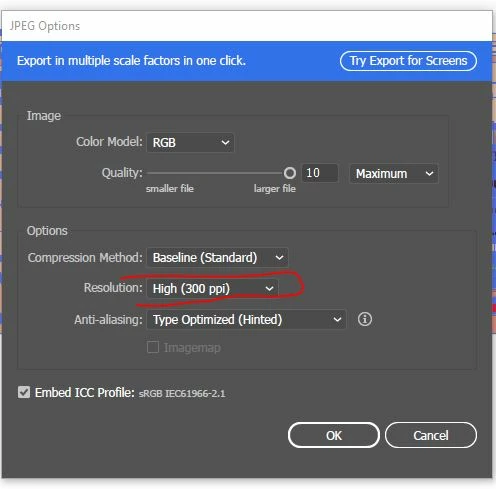
    You can not change the size but you can increase the Resolution to increase the quality when exporting JPGs.
    you can choose between 72,150 and 300 or you can add your custom number.

    2 replies

    Participating Frequently
    October 12, 2021

    Use a 300ppi transparant PNG file instead of a jpg file, which is not lossy. size 100%

    Omar.Fathy
    Community Expert
    Omar.FathyCommunity ExpertCorrect answer
    Community Expert
    June 23, 2019

    You can not change the size but you can increase the Resolution to increase the quality when exporting JPGs.
    you can choose between 72,150 and 300 or you can add your custom number.

    stwoodsAuthor
    Inspiring
    June 23, 2019

    Thank you Omar!