
P.M.B
Legend
December 3, 2018
Answered

Converting Text Shapes to single paths

  • December 3, 2018
  • 5 replies
  • 6058 views

Hi all,

I'm sure I've seen this done but cannot remember how to do it.

My goal is turning a script font into single paths so I can import them to After Effects and use them to emit particles for "write on"  text.

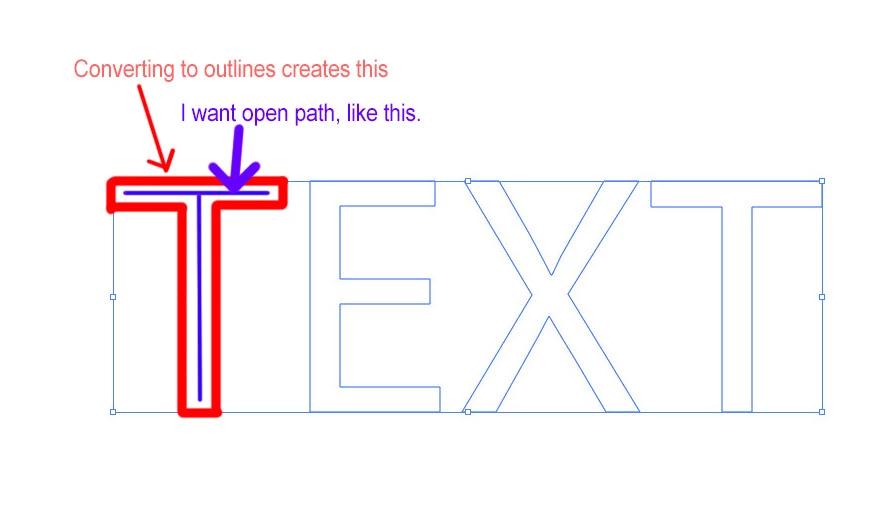
When I create some text in illustrator and then convert it to outlines I have closed shapes.  That's to say I have shapes that can be both stroked and filled.

What I want is a single (open?) path sort of "between" or "inside".  One that could receive a strike but no fill.

For some reason I believe this a simple and basic operation but I do not know what it is.
    This topic has been closed for replies.
    Correct answer Ton Frederiks

    Maybe this script from Jongware helps;

    Re: [Ann] A Monoline Text Drawing Script

    5 replies

    Ton Frederiks
    Community Expert
    Ton FrederiksCommunity ExpertCorrect answer
    Community Expert
    December 4, 2018

    Maybe this script from Jongware helps;

    Re: [Ann] A Monoline Text Drawing Script

    Eugenio.NYC
    Participating Frequently
    December 4, 2018

    Hi,

    Illustrator now supports Variable Fonts, maybe you can try with that

    Regards

    P.M.B
    P.M.BAuthor
    Legend
    December 4, 2018

    Thanks.  I'll look into that.  In this case I just hand drew the paths using the font as a guide.  I didn't take too long, less than a minute per character and I'll only get faster at it so....:)

    ~Gutterfish
    Monika Gause
    Community Expert
    Community Expert
    December 4, 2018

    You might try and Offset path with negative values. Then open the resulting paths.

    Or open the paths and then blend them.

    Possible just drawing a path inside the letters will be the faster method all in all.

    P.M.B
    P.M.BAuthor
    Legend
    December 4, 2018

    Thanks. 

    ~Gutterfish
    chanaart
    Community Expert
    Community Expert
    December 3, 2018

    Not really clear to what you want to achieve when you export it to After Effect..

    Monika Gause
    Community Expert
    Community Expert
    December 3, 2018

    There is no simple way to do this.

    P.M.B
    P.M.BAuthor
    Legend
    December 3, 2018

    Hi Monika,

    Thanks.  When you say there is no simple way, does that mean that the only way to do it is to draw the paths by hand doing my best to match the font? 

    ~Gutterfish