
Known Participant
November 13, 2022
Answered

Copy Colors in Recolor Artwork

  • November 13, 2022
  • 1 reply
  • 492 views

Hi Experts!


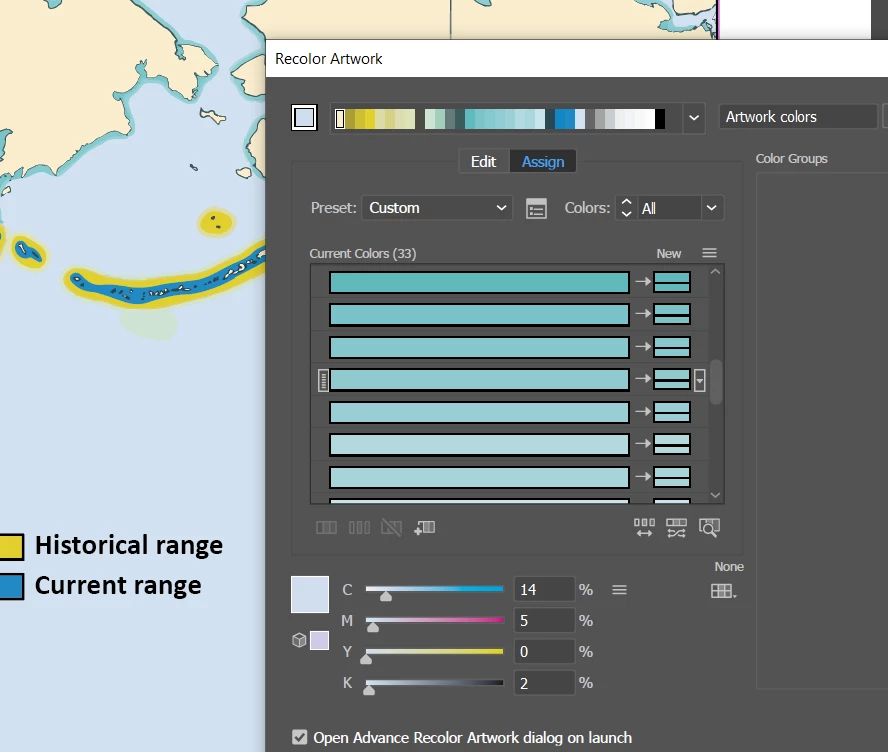
I am working with an AI file that has many blue shades. You can see the number of shades in screenshot. But I want them to be all the same blue color. Is there a way to copy one of the colors to others? Or do I have to type in the CMYK codes of the color I want for each of the unwanted shades?


As always - thanks for the great tips from you all!


Cheers - jdballou


This topic has been closed for replies.
Correct answer Monika Gause

You can merge all the rows into one. And then you can set the colorization method to exact.

https://helpx.adobe.com//illustrator/using/color-groups-harmonies.html#edit_colors_recolor_artwork_dialog_box_overview

1 reply

Monika Gause
Community Expert
Monika GauseCommunity ExpertCorrect answer
Community Expert
November 13, 2022

You can merge all the rows into one. And then you can set the colorization method to exact.

https://helpx.adobe.com//illustrator/using/color-groups-harmonies.html#edit_colors_recolor_artwork_dialog_box_overview

jdballouAuthor
Known Participant
November 20, 2022

Perfect!  Thanks.