Answered
copy layer style in illustrator
Hi all,
I'd like to know how I can copy a layer style (effect, gradient.,,) of an object to another like in photoshop.
I tried eyedropper, but it only picks gradient not the effect.
thanx

Hi all,
I'd like to know how I can copy a layer style (effect, gradient.,,) of an object to another like in photoshop.
I tried eyedropper, but it only picks gradient not the effect.
thanx
Set up the Layer with the effects you want and then highlight the Layer line in the Appearance panel. With the Layer highlighted, from the Graphic Styles panel flyout select New Graphic Style. Give it a name. You should get a new style that looks like this. This will apply the layer style to a new layer.
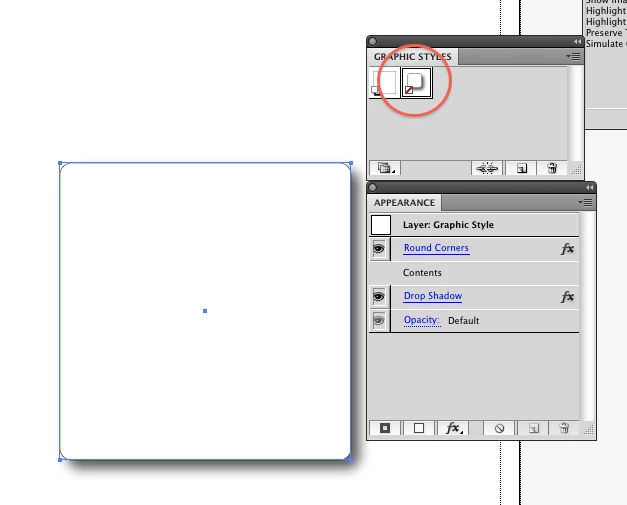
You will have to have a fill and stroke on the items on that layer for it to show.
Already have an account? Login
No account yet? Create an account
Enter your E-mail address. We'll send you an e-mail with instructions to reset your password.


 AdChoices