Known Participant
January 16, 2021
Question

Copy object lost all layers in the Appearance

  • January 16, 2021
  • 3 replies
  • 1305 views

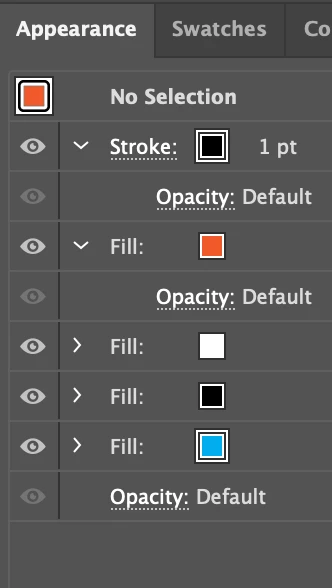
The object has following layers


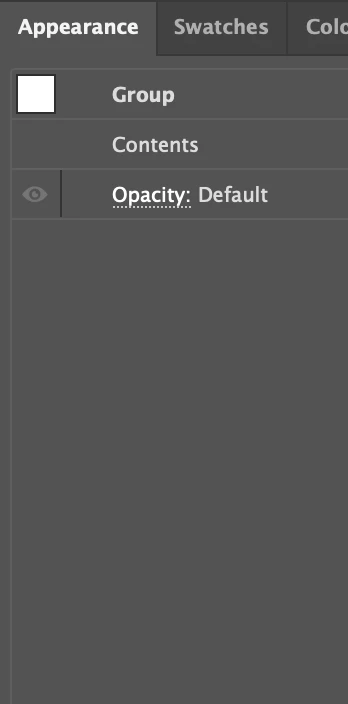
After making a copy of the object, the copied object lost all details
 

This is just a basic operation and Adobe can't make it work? Such a piece of crap...

This topic has been closed for replies.

3 replies

pixxxelschubser
Community Expert
Community Expert
May 30, 2021

I created a demo …

… Try to copy and paste the word "Test" and reproduce it.


By @az97317903

                                                                                   --> jump to quoted post


I tried it with your example file.


  • select with Selection Tool (Black arrow) and then:
    [Alt] + drag

--> works as expected for me


  • select with Selection Tool (Black arrow) and then:
    copy --> paste

--> works as expected for me


Known Participant
May 30, 2021

Thank you very much, [Alt] + drag saved my day!


I think I should use A, not V

Known Participant
May 30, 2021

take it back - "I think I should use A, not V"


Only [Alt] + drag works.

Known Participant
May 30, 2021

Any solution at all? I can't believe this crap can't even handle copy & paste well...

Ton Frederiks
Community Expert
Community Expert
May 30, 2021

If you double click on the contents of the group, do the fills and stroke appear?

What happens if you ungroup?


Known Participant
May 30, 2021

I created a demo. I can't upload it here, it says the format doesn't match the extension.


You can download here https://drive.google.com/file/d/1vFdU55kmLETgDpkdeZuCd60tgJuv4Drt/view?usp=sharing


Try to copy and paste the word "Test" and reproduce it.

Ton Frederiks
Community Expert
Community Expert
January 16, 2021

In your first Appearance panel you have no selection.

In your second Appearance panel you have a group (what is in the content of the group?).

These cannot be compared.

Known Participant
January 16, 2021

The first panel shows the details on the selected object, the 2nd panel shows the details on the copied object.


Ton Frederiks
Community Expert
Community Expert
January 16, 2021

The first panel says: No Selection