

A_Free_Land_73
Participating Frequently
August 4, 2021
Answered

Copy text from outside Illustrator and pasting it in adding a special character at the end

  • August 4, 2021
  • 6 replies
  • 14298 views

In the last two days something has changed.  I copy/past a lot of text from the internet into Illustrator.  Now I get the text I copy but at the end of the line there's an "X" in a box.  It doesn't print but shows up within the art.  I have to manually hightlight and delete it each time...very time consuming.  But if I grab the text tool, click and then hit paste, the X is not there.  This only happens with I directly paste into Illustrator without using the text tool.  So frustrating!  Any help is appreciated. 
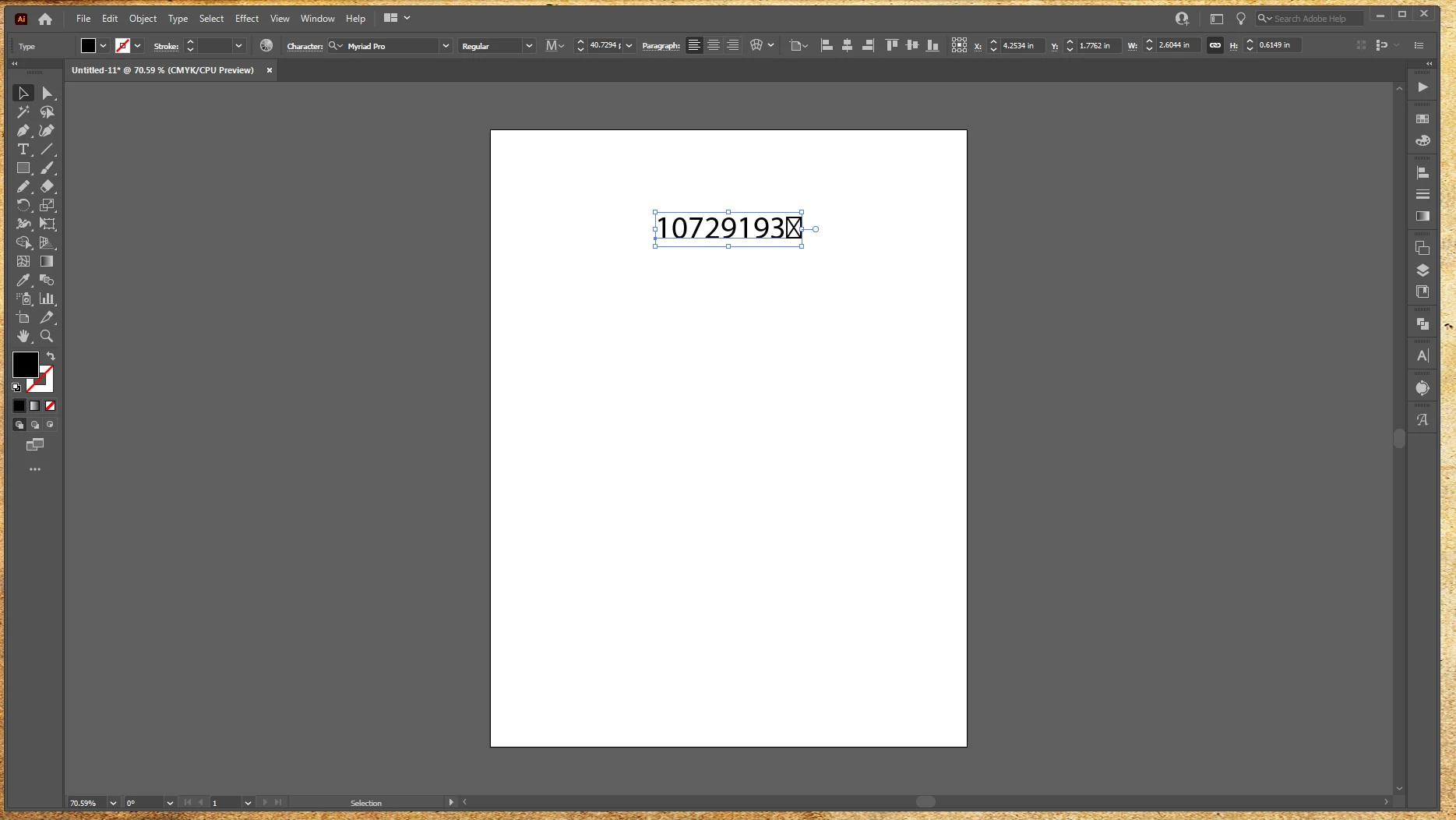
 

{Renamed by MOD}

This topic has been closed for replies.
Correct answer J E L

FYI, this is a confirmed bug that Adobe is aware of.

6 replies

Participant
March 12, 2024

How do you remove the x box at the end of the word?


A_Free_Land_73
Participating Frequently
March 12, 2024

backspace key.  but I've gotten into the habit of using the text tool and clicking first, then pasting my text...no problem that way.  Still annoying that they cannot fix the issue.


Bosko S.
Known Participant
November 29, 2023

Still nothing new with this issue? [removed] it's 2023, and this start in 2021 😄

Solution is to rollback on CS2..

A_Free_Land_73
Participating Frequently
November 29, 2023

Nope, Adobe is too concerned with getting there application startup screens artwork "just right" to be sure they are 1000000% inclusive so their ESG score is not effected.  Maybe their new AI b.s. will get it fixed for them in 10 years.

Participating Frequently
November 4, 2021

This bug showed up for me when I copy text from the fill color dialog box.  I make a few boxes and use the eyedropper tool to fill them with colors from the customer art.  Then I copy the web safe RGB text values from the dialog box and paste that, as text, onto the art board.  In the last version it has begun to paste a little X appended to the value, which I manually delete.

Monika Gause
Community Expert
Community Expert
November 4, 2021

I cannot reproduce that.


Are you sure you are not running some extension that messes with the clipboard?

A_Free_Land_73
Participating Frequently
November 4, 2021

Nothing running out of the usual.  I've used different browsers too. The only fix was rolling back a version.  I wish I had just kept skipping updates now.  I cannot roll back to the version that worked, no longer showing up on my adobe.  

teegeepen
Inspiring
October 26, 2021

it amazes me...the bug has been in existence since August, and still no fix...one of these days..its going to cost me a lot of money because, i am going to forget to delete the character.

A_Free_Land_73
Participating Frequently
October 27, 2021

It is very annoying.  I was hoping after several updates it would have been taken care of.  I don't belive the extra character actually prints, just shows up in your design.

teegeepen
Inspiring
October 27, 2021

you are correct , it does not print, i did not know that

thanks for the tip!

J E L
Community Expert
J E LCommunity ExpertCorrect answer
Community Expert
August 6, 2021

FYI, this is a confirmed bug that Adobe is aware of.

teegeepen
Inspiring
August 13, 2021

thanks Jane, how do you rollback to a previous version? the bug is not a big deal, as long as i am aware of it.

Paul

A_Free_Land_73
Participating Frequently
August 13, 2021

Very simple.

J E L
Community Expert
Community Expert
August 4, 2021

@A_Free_Land_73 Yes, that is strange. Can you please give us more information so we can help you figure out what is going on? What troubleshooting steps have you tried so far? What is your OS and exact version of Illustrator? If this method only changed in the last two days, could it be because you updated to the latest version of Illustrator (v25.4.1)? If you roll back to an earlier version, do you still get the extra character on paste? Have you checked your Preferences > Clipboard Handling to see if "Paste text without formatting" is checked? Have you reset your preferences and relaunched? If none of this helps, where you are copying the text from (the internet is a big place!)? From regular text on a web page or from a table or spreadsheet?


H


A_Free_Land_73
Participating Frequently
August 4, 2021

Sorry for being so vague, my first time posting to the community as I
usually figure these things out in my own. I’m using newest version of AI,
I think it updated Monday. Windows 10. I’m copying from any page using
Google Chrome. I grab the text I need and paste into my layout or design.
I’ve looked over all my preferences and nothing has changed that I can
see. I’ve used AI for almost 20 years and this is the first time I’ve been
stumped. --
Adam


[ private informations removed by moderator for security reasons ]

jane-e
Community Expert
Community Expert
August 4, 2021

Hi @A_Free_Land_73 


Most likely the X in the box respresents a character that is not supported in the typeface you are using.

https://support.microsoft.com/en-us/topic/why-does-some-text-display-with-square-boxes-in-some-apps-on-windows-10-b078a35f-9709-1780-44c0-8c27a58205a2


~ Jane