Participating Frequently
November 8, 2023
Question

Corner radius widget not available on some corners..

  • November 8, 2023
  • 4 replies
  • 762 views

I created a simple shape and edited it to my liking. Corner widgets were availabl;e on every corner and all was good. Then after a while of editing fills, and line strokes etc, the corner widget was simply not available on some corners (see pic)
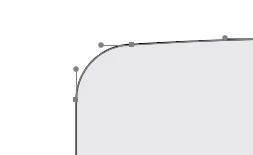
How do I get the cornet widget back? its still there on most of the othewr corners but some of the corners just look like the pic. Is there some way to convert the corner back to having the widget?

This topic has been closed for replies.

4 replies

Monika Gause
Community Expert
Community Expert
November 8, 2023

I would use the Join tool to get those back. THis will only work up to a certain size though.

https://youtu.be/dgnAgttL87s

Fasih K.
Inspiring
November 8, 2023

Here is the video guide

SplatBatAuthor
Participating Frequently
November 8, 2023

OK, I get none of those centre points on mine at all - just those 2 nodes. Ive not edited any of the corner points at all and all but 2 corners still have the corner widget available.

SplatBatAuthor
Participating Frequently
November 8, 2023

OK, I think I fixed it!

I just clicked the "convert selected anchor points to smooth" button and the corner widget re-appeared!

Doug A Roberts
Community Expert
Community Expert
November 8, 2023

If the corner anchor points have been edited in any way, the corner widget will disappear.

Fasih K.
Inspiring
November 8, 2023

It's simple, just delete the center anchor point then cross merge the other two and delete the offset shape. THen select the new corner point you will se the widget again 🙂

SplatBatAuthor
Participating Frequently
November 8, 2023

OK, im going to give away my newbie status here but where's the centre anchor point? I can only see one on either side of the curve!