

yumaridigital
Participant
December 6, 2021
Answered

Corners Are Squaring Unintentionally in Illustrator

  • December 6, 2021
  • 2 replies
  • 268 views

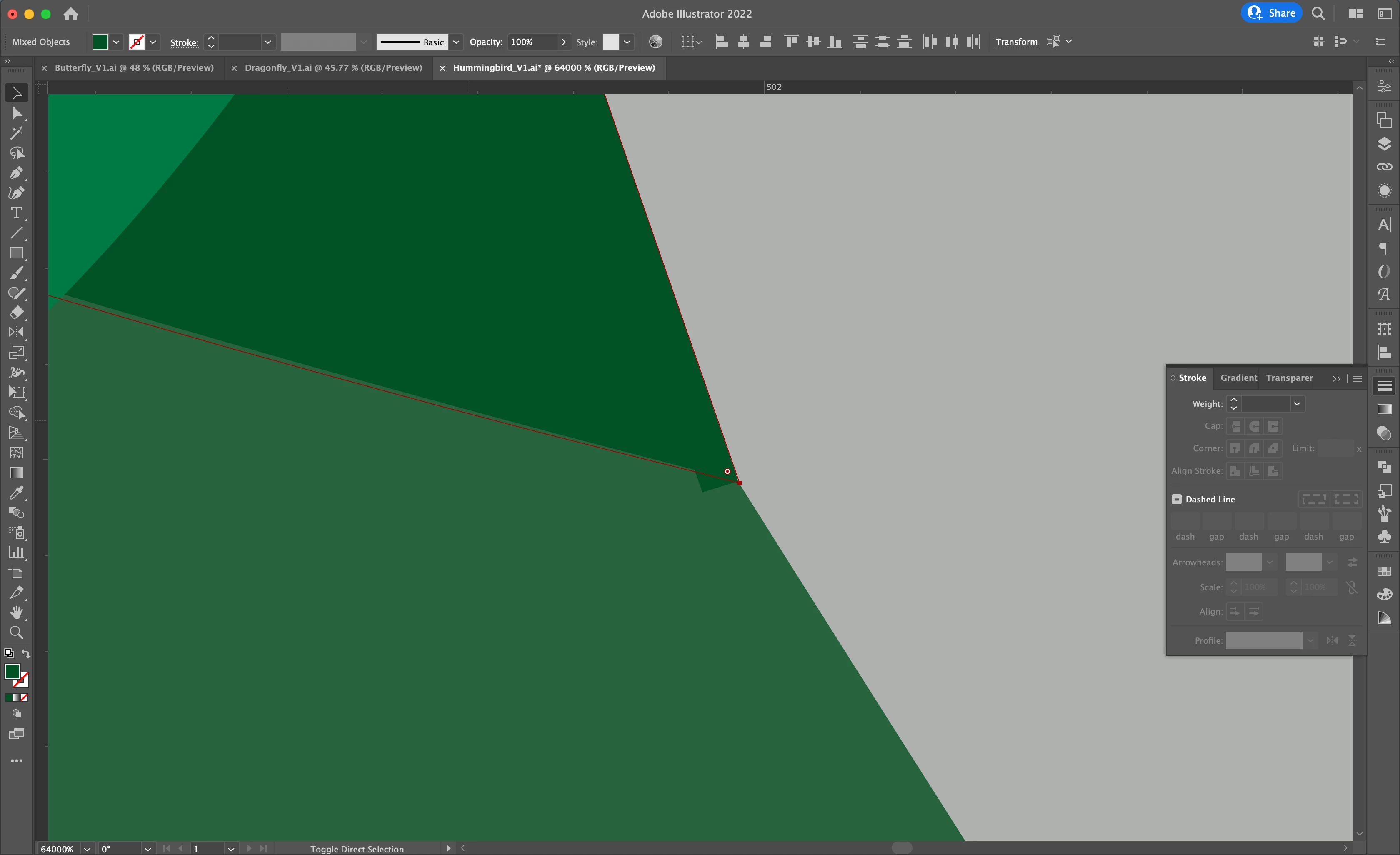
For some reason my corners are displaying a little square at the end of them.

I don't have any color applied to stroke so I don't have ability to adjust miter limit.

Please see attached -- corner in question is highlighted with red path and dark green fill.


It's also strange to me how the darkest green shape isn't aligning perfectly to the path.

The lighter green shape below is layered underneath the dark green, so this isn't a simple overlapping.


Any idea how to fix or troubleshoot these items?


Best,

Kaila
 

This topic has been closed for replies.
Correct answer Ton Frederiks

Could be a GPU Preview problem, try to switch between GPU and CPU with Cmd E.

And check for multiple points on top of each other.

2 replies

Ton Frederiks
Community Expert
Ton FrederiksCommunity ExpertCorrect answer
Community Expert
December 6, 2021

Could be a GPU Preview problem, try to switch between GPU and CPU with Cmd E.

And check for multiple points on top of each other.

yumaridigital
Participant
December 6, 2021

Changing to CPU preview worked, thank you so much!


Best,

Kaila

Ton Frederiks
Community Expert
Community Expert
December 6, 2021

Good to hear that helped. It is just a preview problem and does not affect print or export.

GPU Preview is much faster but sometimes inaccurate.

You may want to work in GPU Preview and from time to time switch with Cmd E when you don't trust the preview.

yumaridigital
Participant
December 6, 2021

I should add that the squaring disappears when I adjust corner radius to be round.


-Kaila