Participant
March 17, 2021
Answered

Create a Signage board with a script

  • March 17, 2021
  • 6 replies
  • 1073 views

Dear fellows,


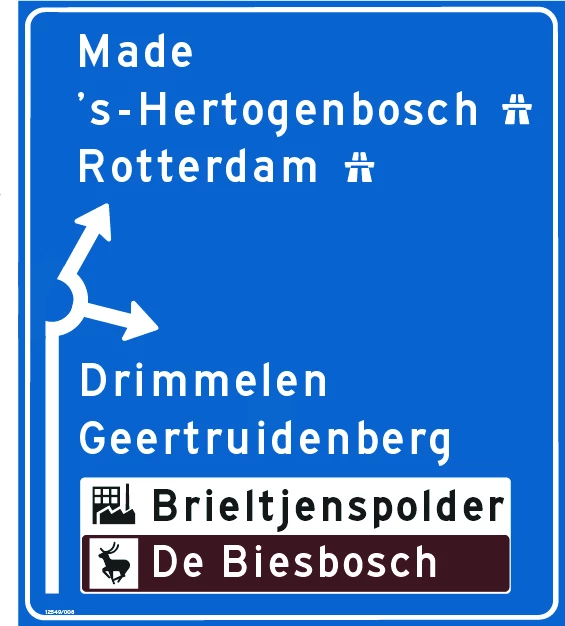
I am doing a research regarding the possibility using a Script to design the attached signage board automatically, see picture. Basic information:

- The input should be generated preferable by an Excel document in which the basic information is installed

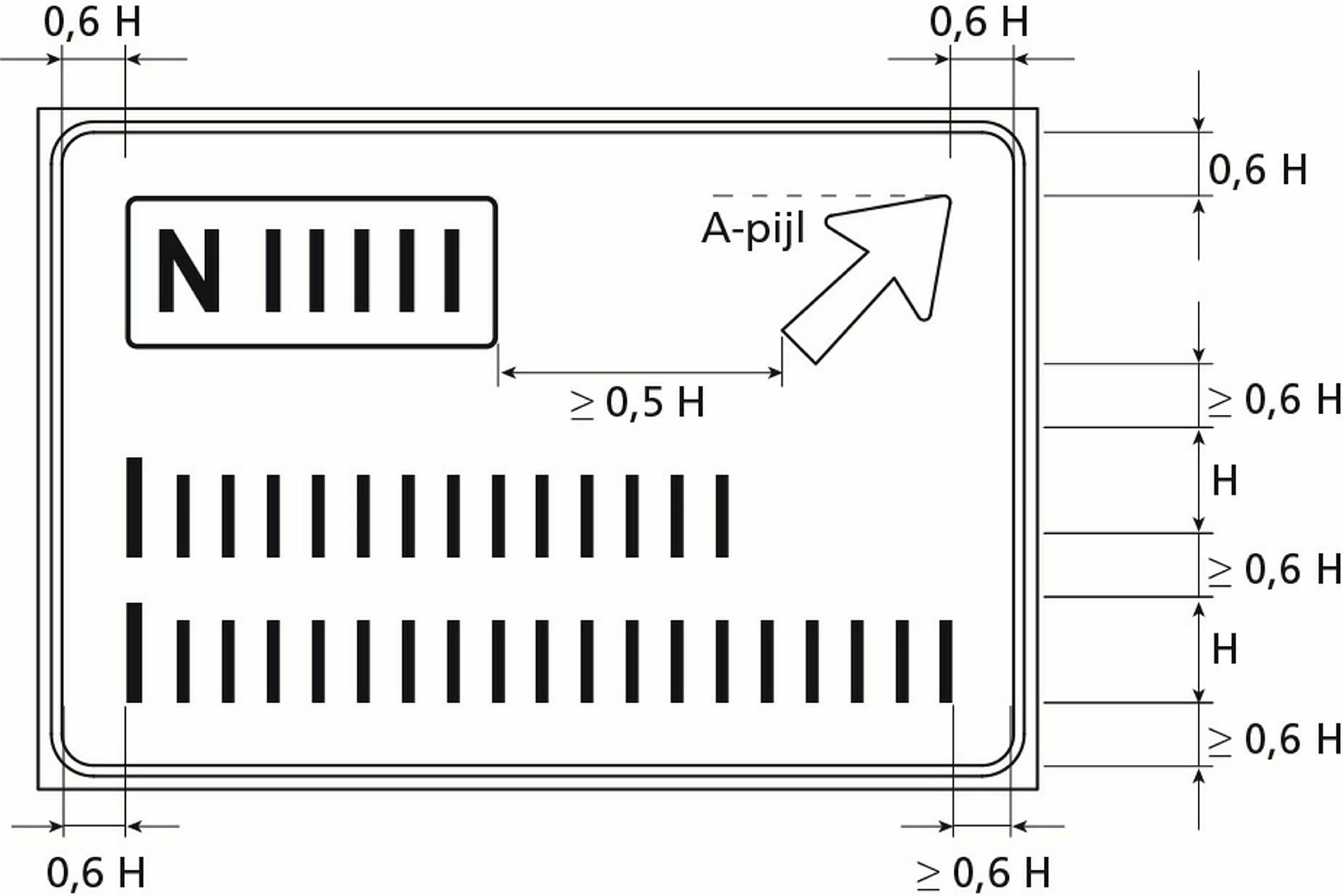
- The height of the capital character is the leading parameter and is input. Based on that the height of the words is defined, as well as the distance of the words to the horizontal and vertical white borders and to other picto's. Also the width of the white borders is based on the height of the capital character, see second picture. The used colors msu be predifed and brown and white are related to the words.


Looking forward for a first reaction. And if needed please ask.

Regards


Eddy Megens

EMBewegwijzering Netherlands  


This topic has been closed for replies.
Correct answer hhas01

This all sounds highly automatable.


While I’m not familiar with Dutch road signs and their precise layout requirements, I’ve prepared a quick video to demonstrate some of the general principles. While bespoke JavaScripts are certainly an option, I’ve used my kiwi language (originally developed for food labeling) to extract two rows of sample data from an Excel spreadsheet and insert it into a tagged Illustrator template, resizing and repositioning the various elements to fit.


This demo generates two artworks from one spreadsheet and one template file, but there’s no limit on the number of templates and artworks that can be handled. More advanced requirements, such as placing prebuilt icons from an icon library, can be supported too.


Incidentally, using a pure Illustrator-based solution (as opposed to, say, a PDF-based automation engine) also has the great advantage that you’re not locked into an all-or-nothing workflow, where artworks must be either 100% automatable or not at all. Generating ordinary .ai files allows artworkers to continue editing by hand once the automation has run.


This approach allows you to grow your automation organically: quickly automating everyday simple tasks (e.g. text insertion and styling) for perhaps an immediate 20-40% reduction in production times over 100% manual artworking. Once this initial semi-automated (“autonomated”) workflow is running smoothly in production, less common/more challenging steps may be incrementally automated later on if/when ROI justifies the additional development. While other tasks, such as aesthetic layout decisions, are naturally best left to human operators to carry out.


If you’ve any questions or would like to discuss further, please get in touch.


Best regards,


Hamish Sanderson
Artwork Automation Specialist

6 replies

Eddy5E82Author
Participant
March 22, 2021

Good day Hamish,


thank you very much for the nice demonstration!!


Yes I like to discuss further with you.


Please sent me your email address

Inspiring
March 22, 2021

Hi Eddy, I’ve sent you a private message with my contact details. Best regards, Hamish

hhas01Correct answer
Inspiring
March 19, 2021

This all sounds highly automatable.


While I’m not familiar with Dutch road signs and their precise layout requirements, I’ve prepared a quick video to demonstrate some of the general principles. While bespoke JavaScripts are certainly an option, I’ve used my kiwi language (originally developed for food labeling) to extract two rows of sample data from an Excel spreadsheet and insert it into a tagged Illustrator template, resizing and repositioning the various elements to fit.


This demo generates two artworks from one spreadsheet and one template file, but there’s no limit on the number of templates and artworks that can be handled. More advanced requirements, such as placing prebuilt icons from an icon library, can be supported too.


Incidentally, using a pure Illustrator-based solution (as opposed to, say, a PDF-based automation engine) also has the great advantage that you’re not locked into an all-or-nothing workflow, where artworks must be either 100% automatable or not at all. Generating ordinary .ai files allows artworkers to continue editing by hand once the automation has run.


This approach allows you to grow your automation organically: quickly automating everyday simple tasks (e.g. text insertion and styling) for perhaps an immediate 20-40% reduction in production times over 100% manual artworking. Once this initial semi-automated (“autonomated”) workflow is running smoothly in production, less common/more challenging steps may be incrementally automated later on if/when ROI justifies the additional development. While other tasks, such as aesthetic layout decisions, are naturally best left to human operators to carry out.


If you’ve any questions or would like to discuss further, please get in touch.


Best regards,


Hamish Sanderson
Artwork Automation Specialist

Disposition_Dev
Legend
March 19, 2021

wow! this is great. well done!

Eddy5E82Author
Participant
March 18, 2021

Dear Carlos,


is it your profession to make scripts? If so I appreciate when you sent me your email address.


Regards


Eddy Megens


CarlosCanto
Community Expert
Community Expert
March 17, 2021

yes, I assumed Illustrator in my answers.


I don't use CorelDraw, but I know it can be automated, so I ignore to what extent.

Eddy5E82Author
Participant
March 17, 2021

Dear Carlos,


many thanks to you for your quick and positive answer!!

Still one question to feel save and to be confirmed; It is Adobe Illustrated that indeed can be used for it?


Many Regards

Eddy Megens


CarlosCanto
Community Expert
Community Expert
March 17, 2021

Is it possible?

- yes a script should be able to create the sign automatically, assuming all elements follow strict rules.

- yes it can take input from Excel (csv)

- yes the size of elements can be relative to an initial reference Input