
Participant
June 30, 2020
Answered

Create color of text on gradient layer

  • June 30, 2020
  • 3 replies
  • 496 views

In Illustrator CC 2020, I am trying to create an inverse color for text that is in a layer in front of a layer that has a gradient fill of red, white, and blue. The purpose is to make the text stand out more clearly, depending on what part of the gradient the characters of text are. How can I do this?
This topic has been closed for replies.
Correct answer PrepressPro1

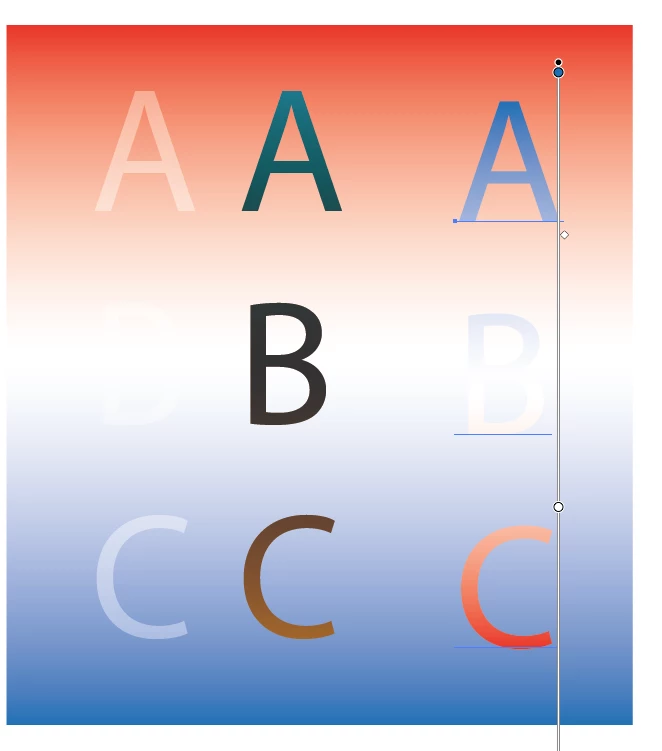
Here is an example of a background grad with the same grad filling text flipped 180º. As you can see my example is not perfect. There is a center portion where the "B" is lost in the white part of the grad. with a bit of fiddeling with the grad you may be able to get some results you are happy with.


3 replies

PrepressPro1
PrepressPro1Correct answer
Legend
June 30, 2020

Here is an example of a background grad with the same grad filling text flipped 180º. As you can see my example is not perfect. There is a center portion where the "B" is lost in the white part of the grad. with a bit of fiddeling with the grad you may be able to get some results you are happy with.


PrepressPro1
Legend
June 30, 2020

The thing I find most important in type being legable when sitting on a colored backgrouns is contrast. I see this often with new designers who are working on their first publication. Just make sure there is enough contrast between the background and the type. Invers may not give you the needed results.

Myra Ferguson
Community Expert
Community Expert
June 30, 2020

If you go to the Transparency panel or click on Opacity in the Appearance panel, you can set the Blend mode to Difference to get the inverse of the colors. However, that's unlikely to make it easier to read. You might consider using black text with a white stroke around it.