Known Participant
October 22, 2021
Answered

create graphic style

  • October 22, 2021
  • 5 replies
  • 578 views

it is possible to create and then apply on a shape a graphic style or brush style like in this images?

..in each corner of  a rectangle there should be an arrow 
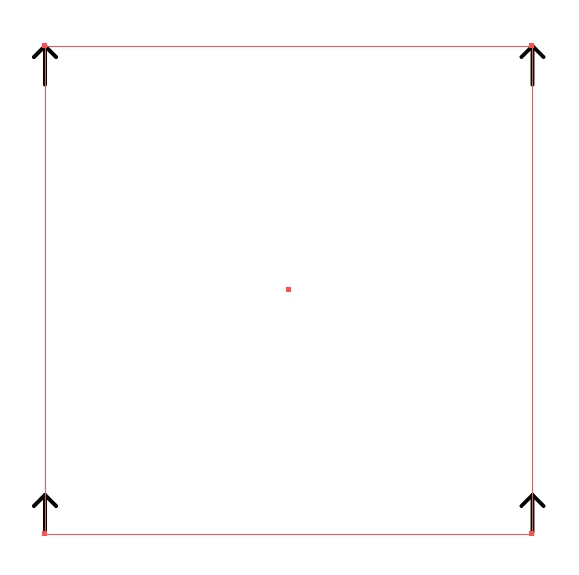
or like this
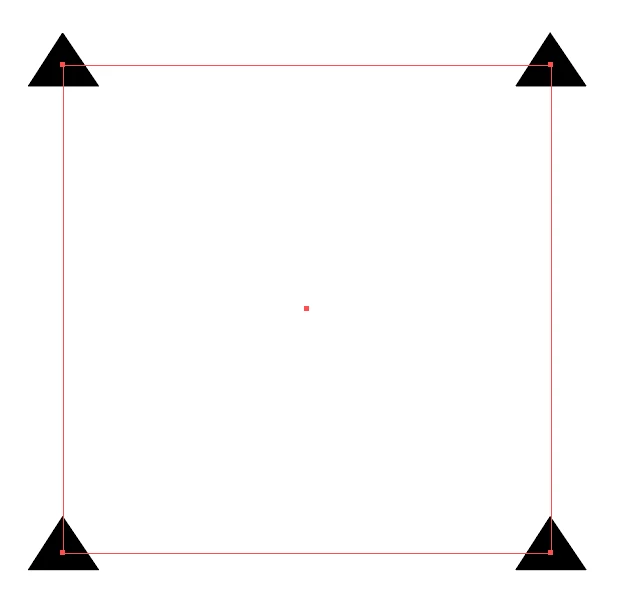


This topic has been closed for replies.
Correct answer Kurt Gold

You can download this file. It contains a sample graphic style.


https://drive.google.com/file/d/1I_hKxdYMYiao3F40BHSIxNaX8O1sDA3k/view?usp=sharing


It could certainly be improved a bit and a different approach would be required if you were using rotated rectangles.


5 replies

Kurt Gold
Community Expert
Community Expert
October 23, 2021

Well, the style I provided is half-baked.


Probably someone else has already made a graphic style that fully supports unrotated as well as rotated rectangles, right?


tromboniator
Community Expert
Community Expert
October 23, 2021

Gold works in mysterious ways.

Kurt Gold
Community Expert
Community Expert
October 22, 2021

That's right, Doug. Some Pathfinder (effects) can serve as a Reverse Path Direction maker. Sometimes that's quite useful.


Kurt Gold
Community Expert
Kurt GoldCommunity ExpertCorrect answer
Community Expert
October 22, 2021

You can download this file. It contains a sample graphic style.


https://drive.google.com/file/d/1I_hKxdYMYiao3F40BHSIxNaX8O1sDA3k/view?usp=sharing


It could certainly be improved a bit and a different approach would be required if you were using rotated rectangles.


Doug A Roberts
Community Expert
Community Expert
October 22, 2021

Superb, Kurt. I'm struggling to figure out what Pathfinder: Add is doing there. It changes the path starting point for some reason?

Kurt Gold
Community Expert
Community Expert
October 22, 2021

Yes, it is possible.


Do you always use unrotated rectangles, as shown in your screenshot above?


Known Participant
October 22, 2021

yes,

i use only rectangles/unrotated

thanks