
Inspiring
January 8, 2020
Answered

Create Polygons with Sides of a Specified Length

  • January 8, 2020
  • 2 replies
  • 10265 views

I'm interested in drawing pictures with tilings of regular polygons of various types. Is there some way to create a polygon in Illustrator and specify that the sides (not the radius) are a certain length? For example, to create a triangle, square, pentagon, and hexagon that each have sides exactly 10 pt long? It doesn't seem to be possible, but I just want to make sure that I'm not missing something. Thanks!
This topic has been closed for replies.
Correct answer Steve Werner

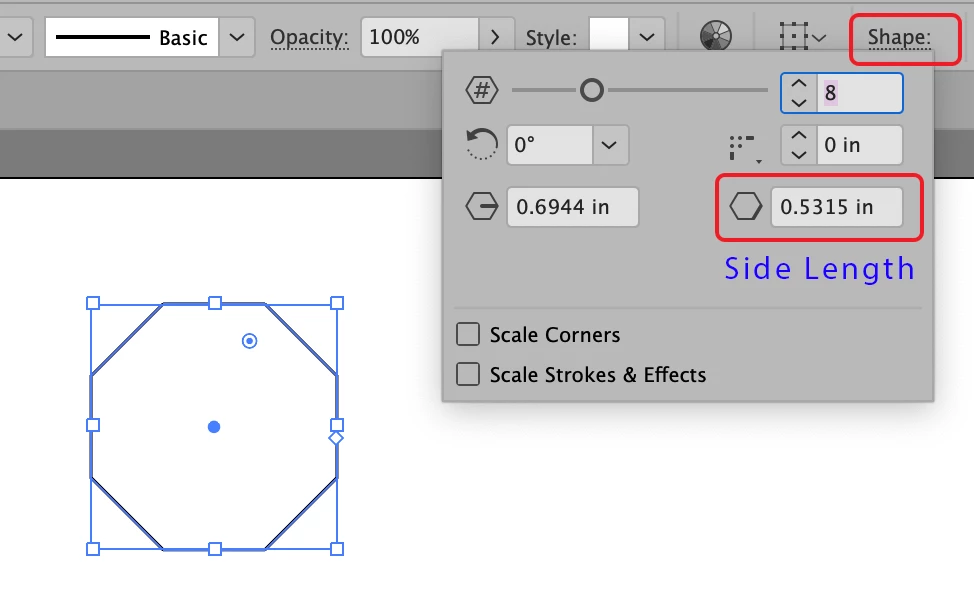
In recent versions of Illustrator, when you use the Polygon tool and look at Shape Properties on the Control panel, it shows the Side Length and you can edit it.


2 replies

CarlosCanto
Community Expert
Community Expert
March 12, 2021
quote

Is there another way to do this?!


Hi RstrAt, you can always use good old math to scale your shape.


Scale % =targetSideLength/currentSideLength*100 


so, lets say your shape's side measures 50 pt and you want to scale it to 70 pt per side


Scale % = 70/50*100 = 140%

Steve Werner
Community Expert
Steve WernerCommunity ExpertCorrect answer
Community Expert
January 8, 2020

In recent versions of Illustrator, when you use the Polygon tool and look at Shape Properties on the Control panel, it shows the Side Length and you can edit it.


Inspiring
January 9, 2020

Thanks Steve, that's great news. I'm on CS3 currently, so I need to upgrade to a more recent version. It would be great if anyone knows which version introduced this improvement to the polygon tool.

Monika Gause
Community Expert
Community Expert
January 9, 2020

It was a CC version.

CC is the only version you can now officially upgrade to anyway.