robertac36537784
Participant
February 2, 2019
Answered

Create Silhouette Then Use as Clipping Mask

  • February 2, 2019
  • 4 replies
  • 5478 views

Hi all

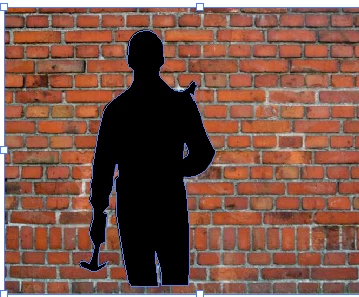
Apologies, I'm sure this has been asked before. Can someone explain, step-by-step, how best to create a silhouette of a person from an image that can be used in the way below:
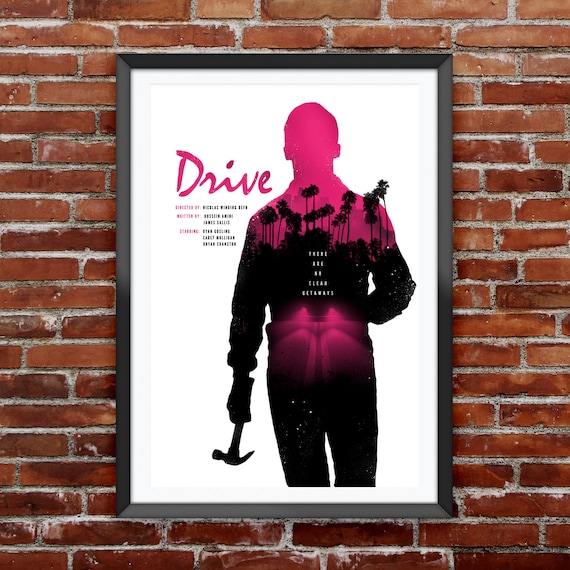
image 0

I have Google'd for hours to work this out with no avail. I believe this may be a clipping mask, but I can't work out:

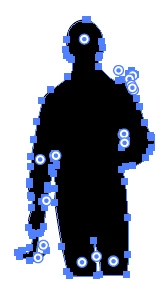
a) How to create the silhouette in the way that can be used with a clipping mask (it always says it won't work)

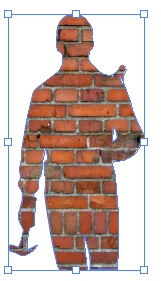
b) Create the clipping mask so it appears in this way

Do I need to be using Photoshop first. If anyone is able to send me a step-by-step guide that would be great. I'm not trying to recreate this work, but this is a good example of what I'm trying to achieve.

Many thanks!
    This topic has been closed for replies.
    Correct answer barbara_a7746676

    OK, you traced the image and it is vector, right?

    The image is underneath the traced vector.

    Select both image and traced vector.

    Then choose Object > Clipping Mask > Make.

    4 replies

    Community Expert
    February 2, 2019

    For hard, precise edges a vector-based shape used as a clipping mask would be the best approach. I'm not a big fan of auto-tracing pixel-based objects unless a "dirty" look with irregularities along the edges of the vector object is desired. It's not difficult to manually trace a silhouette of a person using the pen tool. The keyboard shortcuts in Photoshop and Illustrator both make the pen tool much easier to use (you can modify anchor points on the fly while the path is still being drawn).

    Not everything featuring this kind of second story within a shape has hard edges all the way around. In those cases you'll need to use Photoshop-based tricks like alpha channel masks or layer blending tricks to accomplish the job.

    Jacob Bugge
    Community Expert
    Community Expert
    February 2, 2019

    Bobby,

    It's not difficult to manually trace a silhouette of a person using the pen tool.

    But a person using the hammer tool can be a bit challenging.

    Sorry, it was stronger than I.

    barbara_a7746676
    Community Expert
    barbara_a7746676Community ExpertCorrect answer
    Community Expert
    February 2, 2019

    OK, you traced the image and it is vector, right?

    The image is underneath the traced vector.

    Select both image and traced vector.

    Then choose Object > Clipping Mask > Make.

    marliton
    Community Expert
    Community Expert
    February 2, 2019

    Hi. You can draw the silhouette in Illustrator, then, import the image and create a mask with the silhouette. Or you can create the silhouette and the mask en Photoshop,

    Marlon Ceballos
    Monika Gause
    Community Expert
    Community Expert
    February 2, 2019

    The silhouette can either be traced manually if the template image is not suitable for automatic procedures.

    In case you have a high contrast image with white background (or background that can be isolated with channels in Photoshop), you can increase that contrast first in Photoshop and then autotrace your silhouette.

    All of this requires some more than just superficial knowledge of image editing.

    You might want to research how to use channels in Photoshop.

    The documentation has all about  how to use the pen tool and pencil in Illustrator: How to draw with the Pen, Curvature, or Pencil tool in Illustrator

    robertac36537784
    Participant
    February 2, 2019

    Hi Monika

    Thank you. I am able to trace an image, create a silhouette by then putting a colour overlay on to it. But then when I put it in Illustrator, I cannot apply to be used as a clipping mask. Is it the wrong type of object?

    Thank you.

    JonathanArias
    Legend
    February 2, 2019

    hi,

    i think you are working in the wrong program(s).

    you should be working in photoshop to extract your figure out of the background, than clip and add your graphic inside that clipped mask. Next, bring that into indesign, and layout your text

    You want to use the quick selection tool in photoshop and your refine edge options to get a nice crips selection of the person:

    Removing a person from the background with masking - Learn Photoshop CC Adobe TV - YouTube

    working in the correct programs and using them in the correct order will save you hours of labor plus it keeps things super editable so you can rework things.