irene444
Participant
April 19, 2019
Answered

Creating 3d lines

  • April 19, 2019
  • 3 replies
  • 10636 views

Can I draw a line in a curved path and make it look like a 3d pipe like a curvy drinking straw?

    This topic has been closed for replies.
    Correct answer rcraighead

    Illustator's "3D" is really not that advanced. There may be ways to "Fake it" using 3D, but I'd suggest working with Gradient on a path.
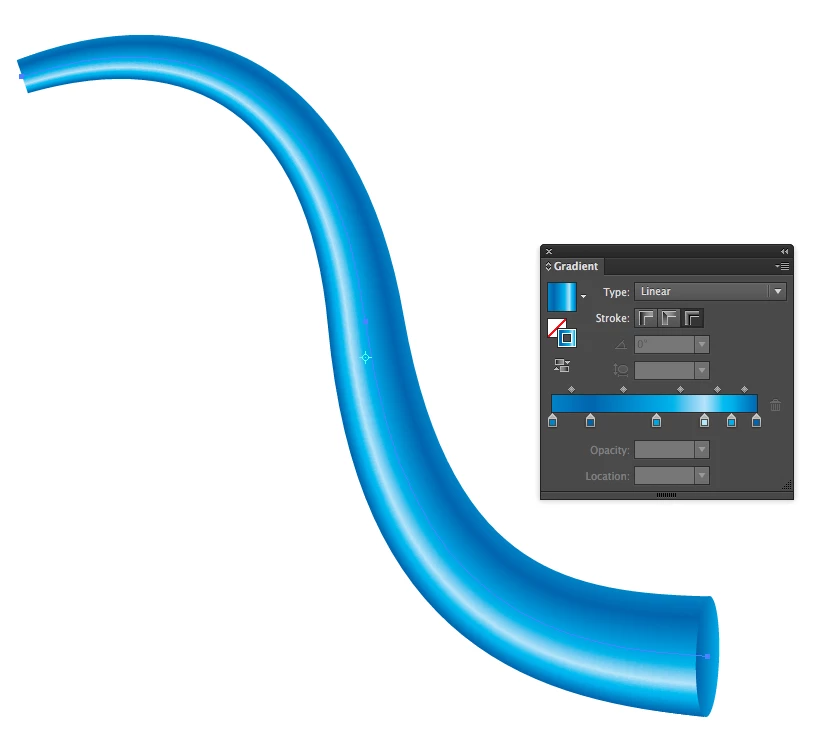
    This example also uses "Path Profiles" to give the illusion of perspective, along with adding a simple ellipse to finish off the end. You might also play with Brushes.

    Edit:

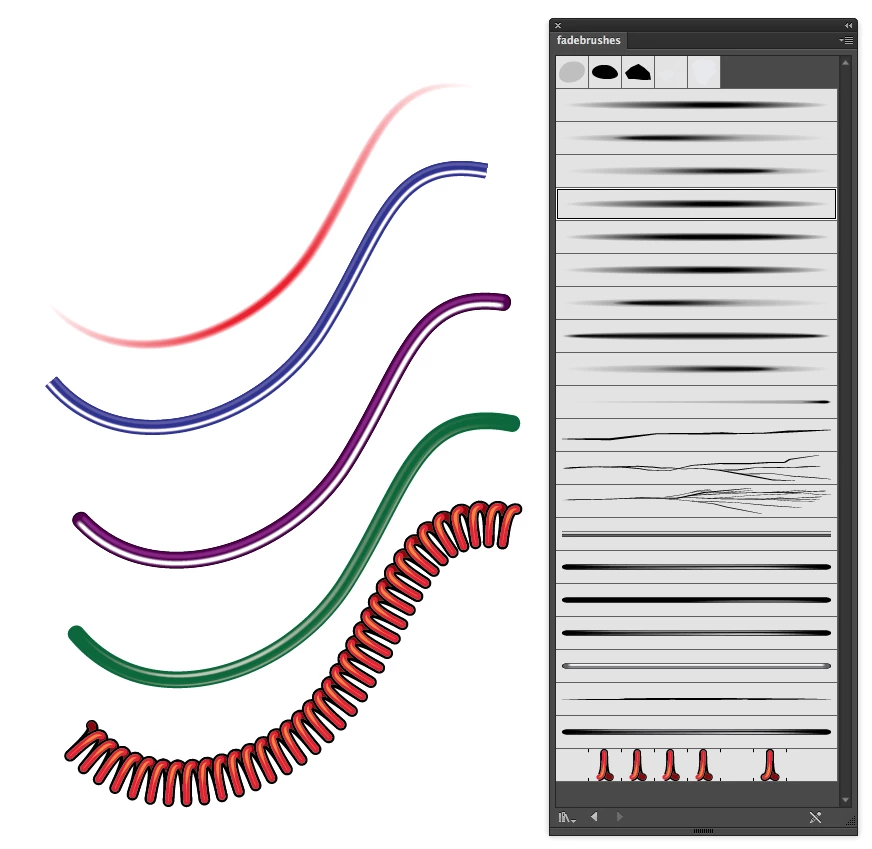
    This is a set of brushes I created for semi-realistic illustrator. They can be colorized and the "faded" ones are transparent so they work well to build highlights and shadows on other base art. Look for "fadebrushes.ai" on this page:
    Studio Blog

    3 replies

    Monika Gause
    Community Expert
    Community Expert
    April 20, 2019

    Two approaches:

    3D effect, but you can only do straight straws:

    Left: artwork to be mappend onto the straw

    Second approach is a blend.

    Left: base artwork. There are at least two of them, both have a transform effect applied.

    And then you need a curved path to use as the blend spine. And then you blend the round things along the spine

    If you want shading, you need to create shapes to shade the "tube"

    angie_taylor
    Legend
    April 20, 2019

    You can use the 3D tools in AI. Create a line in the shape that you want the straw to be bent. This is from memory as I’m not in front of Illustrator but here goes!  Then go to Effects > 3D Extrude and Bevel and select the Revolve function to create rotation around the profile. Alternatively, you can create a circle and then extrude it to create a pipe, there are a few options. Here’s a tutorial that might help you.

    I’d recommend checking out Cineware for Illustrator. It’s a free plugin for Illustrator that allows you to import real 3D models. If you have an Adobe subscription then you will have a copy of Cinema 4D Lite (via After Effects). In here you have true 3D tools so you can make anything. There’s also a load of free content in there, including a drink with a straw!

    Cineware for Illustrator - MAXON | 3D FOR THE REAL WORLD

    rcraighead
    rcraigheadCorrect answer
    Legend
    April 20, 2019

    Illustator's "3D" is really not that advanced. There may be ways to "Fake it" using 3D, but I'd suggest working with Gradient on a path.

    This example also uses "Path Profiles" to give the illusion of perspective, along with adding a simple ellipse to finish off the end. You might also play with Brushes.

    Edit:

    This is a set of brushes I created for semi-realistic illustrator. They can be colorized and the "faded" ones are transparent so they work well to build highlights and shadows on other base art. Look for "fadebrushes.ai" on this page:

    Studio Blog

    irene444
    irene444Author
    Participant
    April 20, 2019

    Just what I needed. Thanks.