Participant
August 21, 2021
Answered

Creating a color gradient on a specific text object part

  • August 21, 2021
  • 7 replies
  • 1147 views

I've got a question regarding your adobe illustrator software: 
Is there a possibility to create a color gradient on a specific part of a text object?

Thank you for your support.

This topic has been closed for replies.
Correct answer Ton Frederiks

Fill the text with white.

Use the Text tool to select the bottom characters and fill them with none.

Use the Selection tool to select the text object

In the Appearance panel add a new fill with a gradient to the text object.

Drag the gradient fill in the Appearance panel below the Characters.
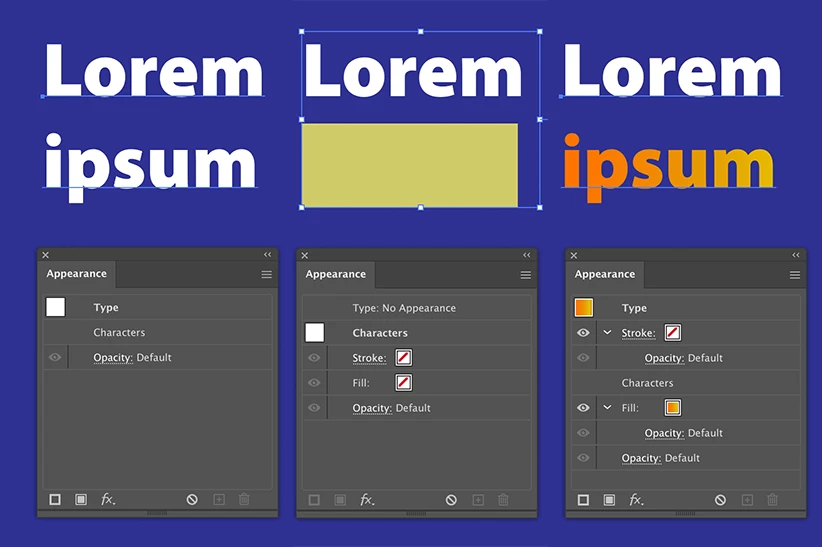
7 replies

Kurt Gold
Community Expert
Community Expert
August 21, 2021

That's right, Ton.


It is based on pattern fills and may (more often than not) require some modifications.


The advantage is that you can apply different gradient fills to single words or characters. Not only one gradient as per your example.


But frankly speaking, I think that most of the time it is rather appropriate to just convert the live type to paths and then apply the desired gradients.


I'd rather assume that no one is going to type an extensive 700 pages book using these live type gradient tricks.


Ton Frederiks
Community Expert
Community Expert
August 21, 2021

Yes editability may be the holy grail, but sometimes it is more efficient to forget about the holy grail.

Kurt Gold
Community Expert
Community Expert
August 21, 2021

Here you can download an Illustrator file with another approach.


https://drive.google.com/file/d/1HnYo9PR_KAxSDt8RPCB4WZQYLgctKSio/view?usp=sharing


Ton Frederiks
Community Expert
Community Expert
August 21, 2021

Yes Kurt, that is a good approach for multiple gradients, it may require some fiddling with positioning.

Jacob Bugge
Community Expert
Community Expert
August 21, 2021

Rita,


If you wish to have a more irregular kind of colour transition(s), you can also place the live Type on top of a larger path with the exact desired colour transition (for the screenshot solid white at the top and a mottled gradient at the bottom, as on the M), then select them both and apply Object > Clipping Mask > Make. You can adjust the exact positioning after the Clipping Mask/clipping set has been established by selecting either and moving it about  (you can select either easily through the expanded Layer).


DougKatz17096006
Inspiring
August 21, 2021

This is pure genius, Ton. All these years… what a thrill to discover a secret like this. Thank you, as always.

Ton Frederiks
Community Expert
Community Expert
August 21, 2021

Thank you Doug, it is using the difference between the fill of the type characters (using the Type selection) and the fill of the type as an object (using the generic Selection tool).

Ton Frederiks
Community Expert
Ton FrederiksCommunity ExpertCorrect answer
Community Expert
August 21, 2021

Fill the text with white.

Use the Text tool to select the bottom characters and fill them with none.

Use the Selection tool to select the text object

In the Appearance panel add a new fill with a gradient to the text object.

Drag the gradient fill in the Appearance panel below the Characters.

Doug A Roberts
Community Expert
Community Expert
August 21, 2021

A text object has a single set of appearance attributes, if that's what you're asking. However, appearances are very versatile things. It may or may not be possible to devise a method depending on the specifics of what you want -- if you want to go into specifics.

Rita5E63Author
Participant
August 21, 2021

This is an example of my problem.

Here I want to gradient the word "Schüler" like the word "Niemand" is. The white text object is a different than the object with the gold gradient. My question: Is there a possiblity to create a color gradient like in "Niemand" for the word "Schüler", even if it is a part of the whole text object with the words before. 

In other words: Can i gradient just the word "Schüler" in the text object "Der Meister war einst ein Schüler" which is white in the picture above?

Ton Frederiks
Community Expert
Community Expert
August 21, 2021

Without seeing what kind of gradient on what specific part, I would say yes.