
Known Participant
August 23, 2017
Answered

Creating a hollow shape and adding thickness

  • August 23, 2017
  • 3 replies
  • 5860 views

Hi! I use a cnc cutter with illustrator files. My files need to have the traceable lines around the edge only (not on the inside). I have this open heart shape that I did make and expand. Then added a stroke. At that point there is usually the original lines on the inside and I use merge. But not working. When I try to select and delete that inside line, the stroke goes away. Please let me know what I am doing wrong. Thanks so much!! Attaching screen shots and AI file.
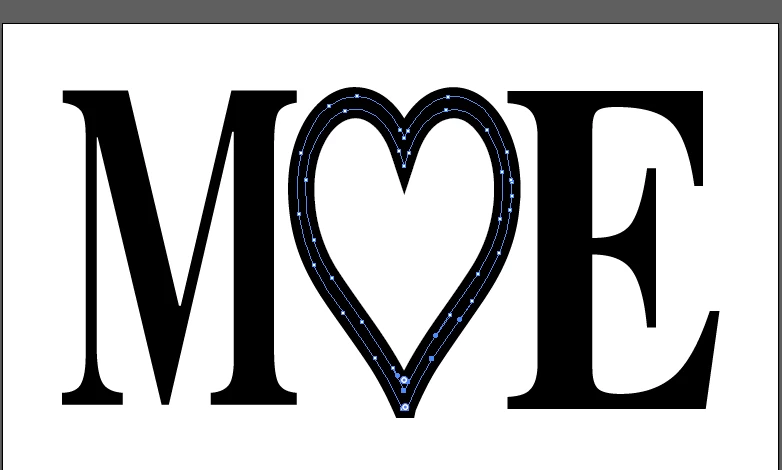

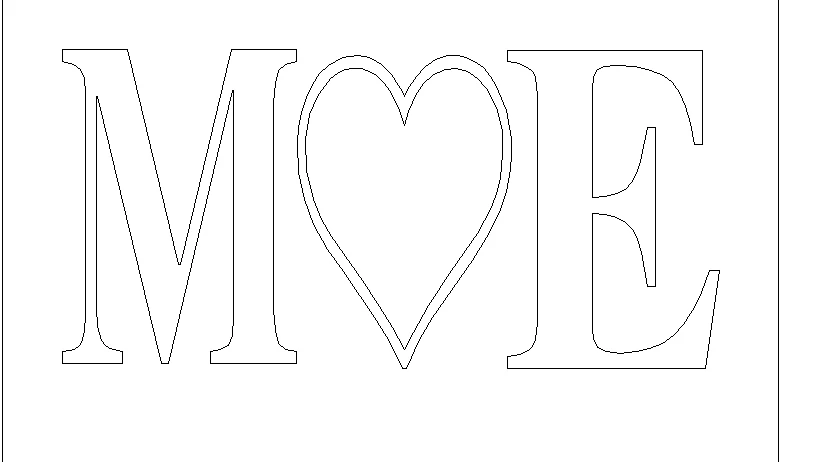
AI file:

https://www.sendspace.com/file/7hrvit

    This topic has been closed for replies.
    Correct answer Bill Silbert

    Select the heart and go under the Object Menu to Expand Appearance. That will make actual strokes of the outer edges and you can then select the inner edges with the direct selection tool and delete.

    3 replies

    Inspiring
    August 24, 2024

    I know this is old, but had someone ask me about this and showed me this past as an example.  So figured I would share the answer.

    Select your outer and inner path on the heart

    Object>Compund Path> Make. Then just use the fill tool as normal

    Jacob Bugge
    Community Expert
    Community Expert
    August 24, 2017

    Jen,

    I have this open heart shape that I did make

    What happens if you start by closing it (select it and Ctrl/Cmd+J), then set the Stroke Weight to give the desired appearance (thickness), then Object>Path>Outline Stroke?

    Bill Silbert
    Community Expert
    Bill SilbertCommunity ExpertCorrect answer
    Community Expert
    August 23, 2017

    Select the heart and go under the Object Menu to Expand Appearance. That will make actual strokes of the outer edges and you can then select the inner edges with the direct selection tool and delete.

    jennmc1Author
    Known Participant
    August 23, 2017

    Hi Bill, when I select the heart only expand is available. Expand appearance is grayed out.

    Monika Gause
    Community Expert
    Community Expert
    August 23, 2017

    Select it, open the Appearance panel and see what you got.

    If there are some Effects or stuff in there, try Object > Expand appearance.