Hi @TW-22341, I spent a lot of time some while ago trying to work out a good way to get an item's bounds, even if it was clipped or whatever, and I made a function that has a good try at doing so, although it won't be perfect in strange case, eg. where effects like drop shadows are added.
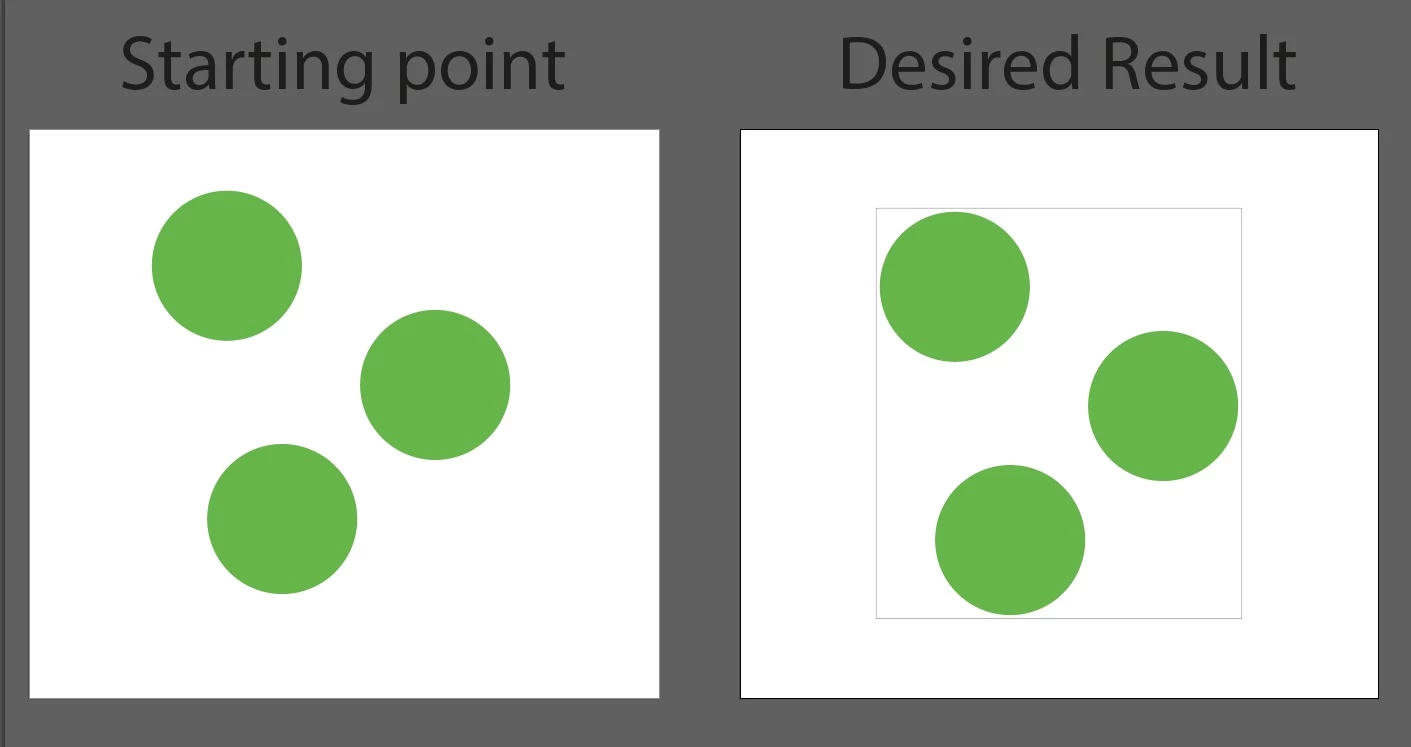
I've thrown together a quick script that uses those functions I already wrote and I think it should do what you ask for. Let me know how it goes for you. You can adjust the "settings" object.
- Mark
Edit 1: improved handling of text.
Edit 2: simplified code, changed getItemBounds to handle multiple items as parameter, moved rect behind objects as per OP's code.
(function () {

    var mm = 2.834645;

    // the colors of the rectangle
    var black = new GrayColor(),
        cyan = new CMYKColor();

    black.gray = 100
    cyan.cyan = 100;
    cyan.magenta = 0;
    cyan.yellow = 0;
    cyan.black = 0;;

    // user settings:
    var settings = {

        margin: 1 * mm,
        strokeColor: black,
        strokeWidth: 1

    };

    var doc = app.activeDocument,
        items = doc.selection;

    if (items.length == 0) {
        alert('Please make a selection and try again.');
        return;
    }

    var lastItem = items[items.length - 1],
        bounds = getItemBounds(items);

    if (bounds == undefined)
        return;

    // add margin
    bounds[0] -= settings.margin;
    bounds[1] += settings.margin;
    bounds[2] += settings.margin;
    bounds[3] -= settings.margin;

    // draw the rectangle
    var rect = doc.pathItems.rectangle(bounds[1], bounds[0], bounds[2] - bounds[0], bounds[1] - bounds[3]);
    rect.filled = true;
    rect.fillColor = cyan;
    rect.stroked = true;
    rect.strokeWidth = settings.strokeWidth;
    rect.strokeColor = settings.strokeColor;

    // put the rectangle behind all the items
    rect.move(lastItem, ElementPlacement.PLACEAFTER);

    // leave just the rectangle selected
    app.selection = null;
    rect.selected = true;

    // finished


    /**
     * Returns bounds of item.
     * @author m1b
     * @version 2022-10-28
     * Attempts to get correct bounds
     * of clipped groups.
     * @param {PageItem|Array<PageItem>} item - an Illustrator PageItem or array of PageItems.
     * @param {Boolean} [geometric] - if false, returns visible bounds.
     * @param {Array} [bounds] - @private parameter, used when recursing.
     * @returns {Array} - the calculated bounds.
     */
    function getItemBounds(item, geometric, bounds) {

        var newBounds = [];

        if (
            item.typename == 'GroupItem'
            || item.constructor.name == 'Array'
        ) {

            var children = item.typename == 'GroupItem' ? item.pageItems : item,
                contentBounds = [];

            if (
                item.hasOwnProperty('clipped')
                && item.clipped == true
            ) {

                // item is clipping group
                var clipBounds;
                for (var i = 0; i < children.length; i++) {

                    var child = children[i];
                    if (
                        child.hasOwnProperty('clipping')
                        && child.clipping == true
                    )
                        // the clipping item
                        clipBounds = child.geometricBounds;

                    else
                        // a clipped content item
                        var b = expandBounds(getItemBounds(child, geometric, bounds), contentBounds);

                }
                newBounds = intersectionOfBounds([clipBounds, contentBounds]);

            }

            else {

                // item is a normal group
                for (var i = 0; i < children.length; i++) {
                    var child = children[i];
                    var b = expandBounds(getItemBounds(child, geometric, bounds), contentBounds);
                }

                newBounds = contentBounds;

            }

        }

        else if (item.typename == 'TextFrame') {

            // item is a text frame
            var dup = item.duplicate().createOutline();
            newBounds = geometric ? dup.geometricBounds : dup.visibleBounds;
            dup.remove();

        }

        else {

            // item is not clipping group
            newBounds = geometric ? item.geometricBounds : item.visibleBounds;

        }

        bounds = (bounds == undefined)
            ? bounds = newBounds
            : bounds = expandBounds(newBounds, bounds);

        return bounds;

    };


    /**
     * Returns bounds that encompass both bounds.
     * @author m1b
     * @version 2022-07-24
     **
     * @param {Array} b1 - bounds array [l, t, r, b].
     * @param {Array} b2 - bounds array [l, t, r, b].
     * @returns {Array} - the encompassing bounds.
     */
    function expandBounds(b1, b2) {

        var expanded = b2;

        for (var i = 0; i < 4; i++) {
            if (b1[i] != undefined && b2[i] == undefined) expanded[i] = b1[i];
            if (b1[i] == undefined && b2[i] != undefined) expanded[i] = b2[i];
            if (b1[i] == undefined && b2[i] == undefined) return;
        }

        if (b1[0] < b2[0]) expanded[0] = b1[0];
        if (b1[1] > b2[1]) expanded[1] = b1[1];
        if (b1[2] > b2[2]) expanded[2] = b1[2];
        if (b1[3] < b2[3]) expanded[3] = b1[3];

        return expanded;

    };


    /**
     * Returns the overlapping rectangle
     * of two or more rectangles.
     * @author m1b
     * @version 2022-07-24
     * NOTE: Returns undefined if ANY
     * rectangles do not intersect.
     * @param {Array} arrayOfBounds - an array of bounds arrays [l, t, r, b].
     * @returns {Array} - bounds array [l, t, r, b] of overlap.
     */
    function intersectionOfBounds(arrayOfBounds) {

        // sort a copy of array
        var bounds = arrayOfBounds
            .slice(0)
            .sort(function (a, b) { return b[0] - a[0] || a[1] - b[1] });

        // start with first bounds
        var intersection = bounds.shift(),
            b;

        // compare each bounds, getting smaller
        while (b = bounds.shift()) {

            // if doesn't intersect, bail out
            if (!boundsDoIntersect(intersection, b))
                return;

            var l = Math.max(intersection[0], b[0]),
                t = Math.min(intersection[1], b[1]),
                r = Math.min(intersection[2], b[2]),
                b = Math.max(intersection[3], b[3]);

            intersection = [l, t, r, b];

        }

        return intersection;

    };


    /**
     * Returns true if the two bounds intersect.
     * @author m1b
     * @version 2022-10-04
     * @param {Array} bounds1 - bounds array [l, t, r, b].
     * @param {Array} bounds2 - bounds array [l, t, r, b].
     * @param {Boolean} TLBR - whether bounds arrays are interpreted as [t, l, b, r].
     * @returns {Boolean}
     */
    function boundsDoIntersect(bounds1, bounds2, TLBR) {

        if (TLBR === true)
            // TLBR
            return !(
                bounds2[0] > bounds1[2]
                || bounds2[1] > bounds1[3]
                || bounds2[2] < bounds1[0]
                || bounds2[3] < bounds1[1]
            );

        else
            // LTRB
            return !(
                bounds2[0] > bounds1[2]
                || bounds2[1] < bounds1[3]
                || bounds2[2] < bounds1[0]
                || bounds2[3] > bounds1[1]
            );

    };


})();



 AdChoices