
Participant
March 18, 2018
Answered

Creating an Outline of an object

  • March 18, 2018
  • 2 replies
  • 1045 views

Hello everyone,

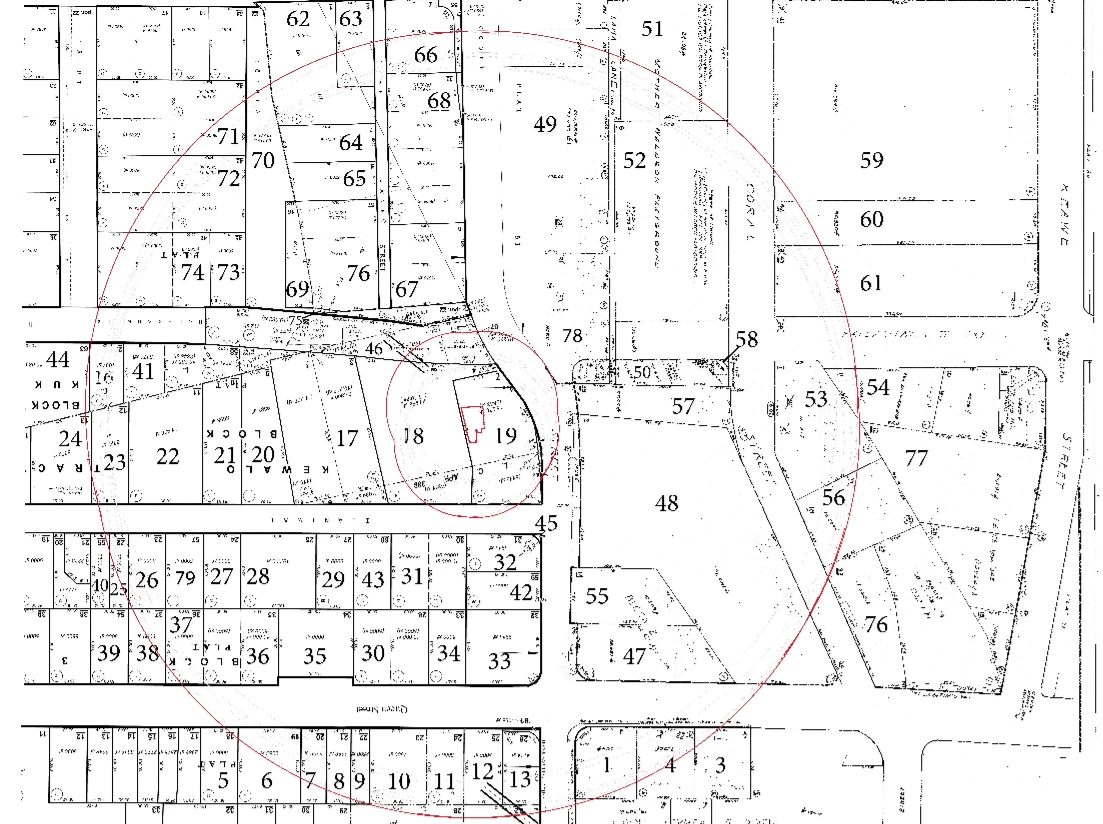
I am trying to put together a map that outlines 500ft (1in = 50 ft) from a proposed premise. Does anyone know how I can create an outline of a shape that is exactly 10 inches away from all points of the proposed shape? Please find below an image of what I am trying to do. There are two outlines in the image below. Any help would be greatly appreciated.
This topic has been closed for replies.
Correct answer Monika Gause

If I understand correctly, then Object > Path > Offset path

2 replies

Luke Jennings
Inspiring
March 20, 2018

There is a duplicate post of this topic in the InDesign forum,

Creating an outline of an object that is a certain distance away from all points

where it was correctly pointed out that this method is not exact, in that the corners of a rectangular shape will be farther away from the object than the sides. If you add the round corner effect to the offset path in the same amount as the offset, that will be closer, but still not precise. Another method is to use the trap tool to create an offset path, it's not more accurate than rounding the corners of an offset path, but I wanted to point it out in case someone finds it useful.

Monika Gause
Community Expert
Monika GauseCommunity ExpertCorrect answer
Community Expert
March 18, 2018

If I understand correctly, then Object > Path > Offset path

manny808Author
Participant
March 18, 2018

Thank you! Do you perhaps know a way to do away with the inner lines of the offset path so that just the outer lines are visible? When i tried to use the eraser tool it created odd lines instead of erasing.

Monika Gause
Community Expert
Community Expert
March 18, 2018

You should make sure that the path is closed before using Offset path..

To edit afterwards, you would need to cut the path with the scissors tool. Then you can delete what you don't need.