Known Participant
July 2, 2026
Question

creating stroke outline

  • July 2, 2026
  • 4 replies
  • 42 views

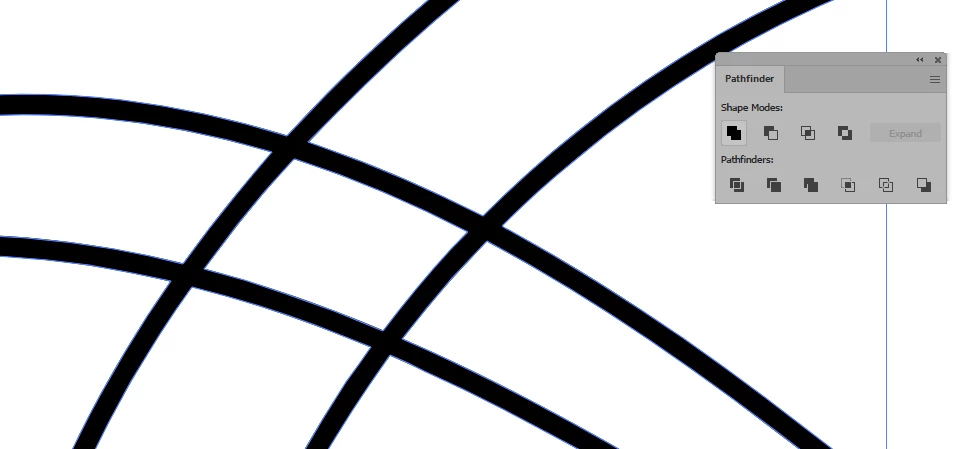
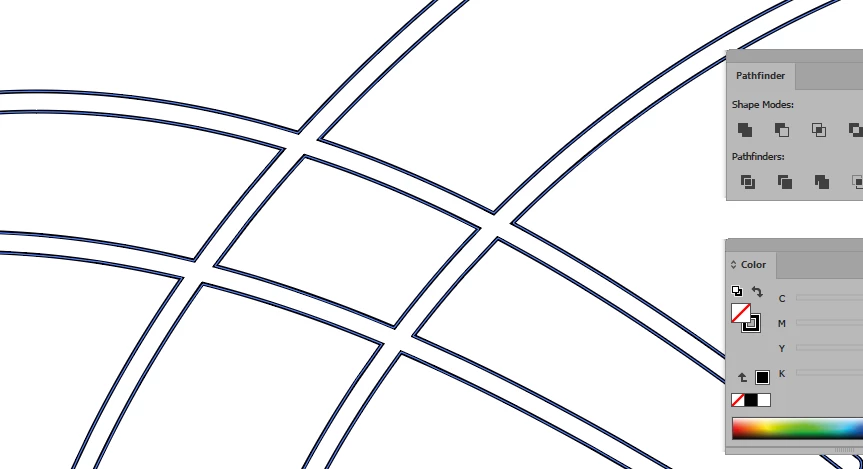
Hello, I am trying to create multiple stroked paths and then outline them.  Upon outline stroke, I get paths where the paths overlap… (please see attached images)… I find it hard to select and delete these parts of the path… I am trying to create an outline of the entirety of the paths without the overlapping paths...just one outline… help???
    4 replies

    Jacob Bugge
    Community Expert
    Community Expert
    July 2, 2026

    ipanema,


    Mentioned in his absence, I am sure that Ton suggested the Unite after outlining rather than instead of outlining.


    To use it for laser cutting the outer shape, you need to outline and unite because otherwise the cuts will just be along the spine of the paths.


    You can switch from fill to stroke if needed for the laser software.


    Tina_Irvine
    Community Expert
    Community Expert
    July 2, 2026

    Hi ​@ipanema451, while it will no longer be strokes, to get the look that it seems like you’re trying to achieve, try selecting your strokes and choose Object > Expand. From there, you’ll be able to use your pathfinder if you want to knockout the white and/or join the black.

    Known Participant
    July 2, 2026

    thanks, I believe I need to have strokes as in the end I am using this for laser cutting...

    Tina_Irvine
    Community Expert
    Community Expert
    July 2, 2026

    @ipanema451,

    Strokes need to have an one end point and one beginning point. To make it continuous, you’d need to trace and back-trace over the same paths, so that it’s one line only. Unfortunately, the pathfinder tools won’t work that way.

    Bill Silbert
    Community Expert
    Community Expert
    July 2, 2026

    Are you selecting all of the paths at once and then applying the outline path function? If so try selecting each path individually and see if the same thing happens.

    Ton Frederiks
    Community Expert
    Community Expert
    July 2, 2026

    @ipanema451 Did you try Unite from the Pathfinder panel?

    Known Participant
    July 2, 2026

    When I use pathfinder/unite on those strokes, I get the second screen shot...


    RvdT
    Legend
    July 3, 2026
    strokes
    Object > Expand appearance


    Window > Pathfinder > Unite

    Swap fill and stroke colors (Shift + X)