Participant
March 16, 2024
Answered

Cross lines

  • March 16, 2024
  • 3 replies
  • 411 views

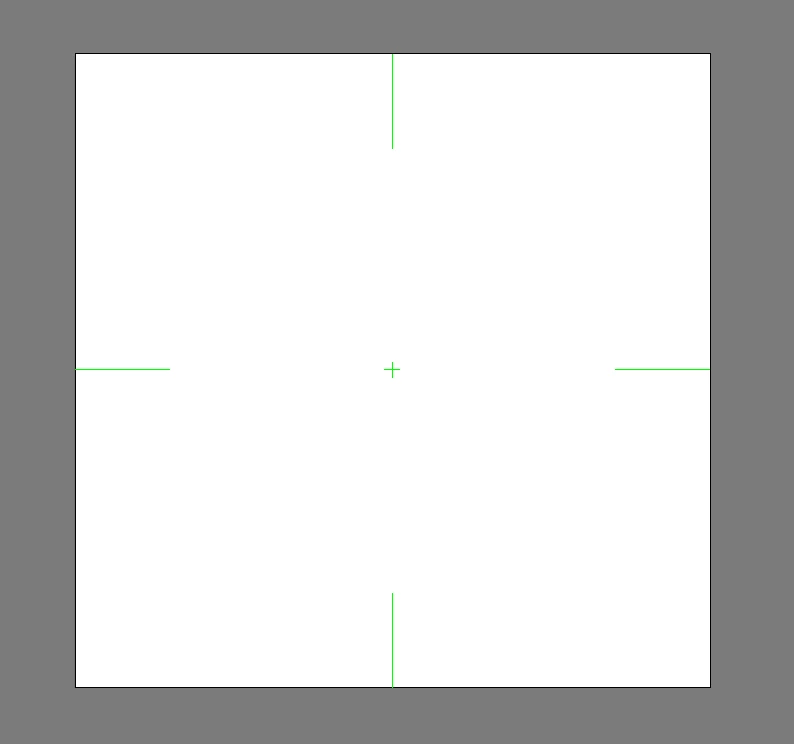
For some reason I can't get rid of these crosslines. 

I tried to hide rulers and lines. I have no idea how these ended up in there. It's probably something totally simple. I have them since the very last update. Does anyone have a solution please?
This topic has been closed for replies.
Correct answer Kurt Gold

Double click on the Artboard tool to open the Artboard Options.


In the Display section turn off the corresponding options.

3 replies

Ton Frederiks
Community Expert
Community Expert
March 16, 2024

The cross hairs probably came there when you created a new document based on a video/film preset.

They won't appear when you use print or art & illustration as preset for new documents.

Participant
March 16, 2024

Nope I did no creation of a video/ film preset. I found that part on google as well, and it looks totally different than what I posted.

As I mentioned above, I downloaded the last update and it was there after the installation. So Kurt Gold already helped me quick and with the right answer.

Why it did that? I don't know, and I don't have any will to find out why. And It shouldn't be further questioned why it did what it did...I'm not an Adobe programmer. I have a solution for my problem and that's all that matters to me. 

Ton Frederiks
Community Expert
Community Expert
March 16, 2024

Thank you so much for your kind words. Good to hear you are pleased with the solution.

Participant
March 16, 2024

Thank you so much! 

Sooooooooo simple, and I'm going nearly crazy over the general settings. 😃 I appreciate your quick help!

Kurt Gold
Community Expert
Kurt GoldCommunity ExpertCorrect answer
Community Expert
March 16, 2024

Double click on the Artboard tool to open the Artboard Options.


In the Display section turn off the corresponding options.