
Known Participant
July 19, 2011
Question

[CS4] How to create list entries having button using ADM ?

  • July 19, 2011
  • 1 reply
  • 954 views

Hi All,

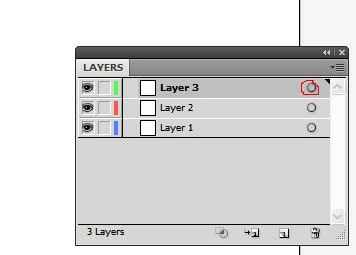
I  want to create list box using ADM whose entries can have button. like we see in layer panel, there is a button to select arts of layer as figure shows.

I tried to use function like  sADMItem->AddItem(listBoxRef,linkButton)  but there is no effect.

plz suggest how to do so.
Thanks

This topic has been closed for replies.

1 reply

INeedSolAuthor
Known Participant
July 20, 2011

No suggestion ?

A. Patterson
Inspiring
July 20, 2011

You can do this, but its a lot of work.

First, you can't add buttons to list entries. Second, that's not an ADM list in the Layers panel, thats an ADM Hierarchy Control. If you have no children of top-level items, then it will look like a list.

To do this, you'll need to use an ADM Hierarchy Control and you'll have to implement the Draw() routine of the entries of said control. It'll be up to you to draw everything -- the icon, the text, etc. Then you can also draw your 'button'.

Next, you'll need to implemented the Track() routine. You can have it do the default for most things, but you'll need to check for clicks and see if they're in the bounds of the 'button' you drew. If so, you can do whatever you want that button to do (and change some state that makes the button draw differently). I don't reccommend animating the press of the button, though that's probably doable (its likely very hard though).

The code for this is quite extensive, but I'd look at IADMHierarchyList.hpp & BaseADMHierarchyList.hpp/cpp in the SDK directory. You'll be sub-classing those guys to do all this. I don't know if there's any sample code demonstrating this or not.

INeedSolAuthor
Known Participant
July 21, 2011

Thank for the  response.

thanks