Participant
August 12, 2025
Answered

Cuenta Gotas : NO FUNCIONA en Illustrator

  • August 12, 2025
  • 2 replies
  • 180 views

Hola!

Alguien sabe por qué el cuentagotas no identifica el color de una imagen (jpg) vinculada en el documento de illustrator?

Tengo dos iMac, en una si, en el otro, no... i la configuración, a priori, es la misma

Gracias

Correct answer creative explorer

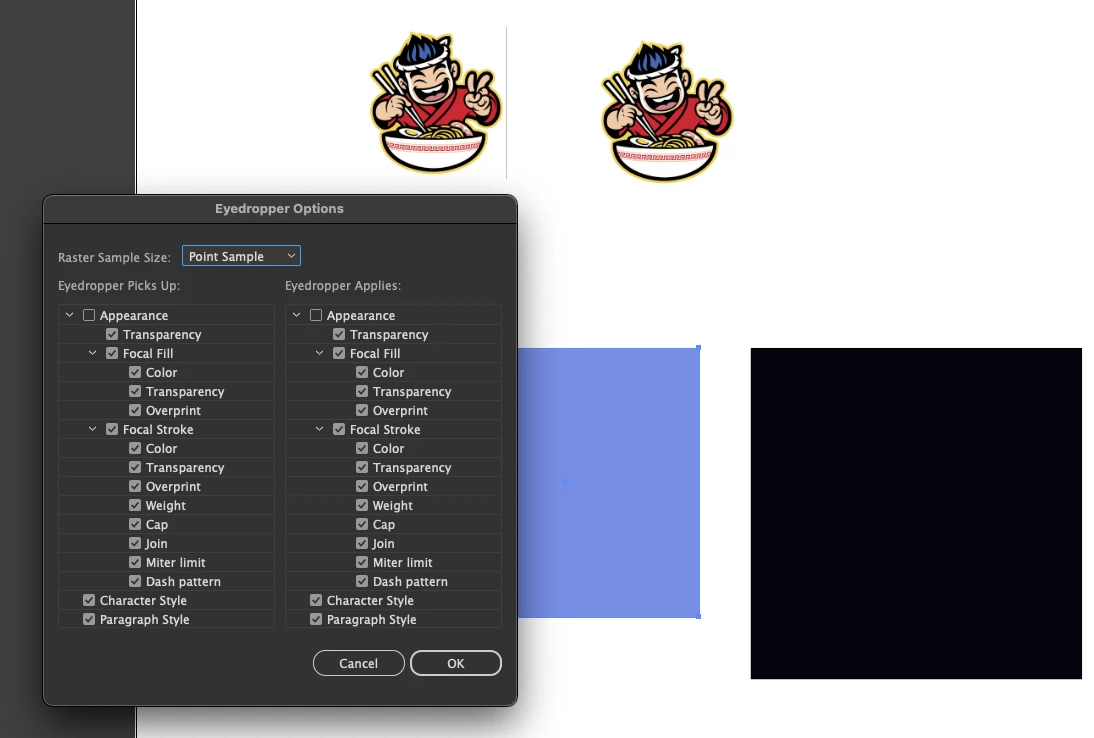
@montserrat24627548dgkn  in addition to @Anubhav M  it likely has to do with the eyedropper options. Double-click the Eyedropper tool in the toolbar to open the options dialog. You can either uncheck or check the "Appearance" box or manually select the things you want to 'sample' from. 


2 replies

creative explorer
Community Expert
creative explorerCommunity ExpertCorrect answer
Community Expert
August 12, 2025

@montserrat24627548dgkn  in addition to @Anubhav M  it likely has to do with the eyedropper options. Double-click the Eyedropper tool in the toolbar to open the options dialog. You can either uncheck or check the "Appearance" box or manually select the things you want to 'sample' from. 


m
Participant
August 12, 2025

Muchas gracias, he deseleccionado la opción de "apariencia" en las 2 columnas y voilà! ahora funciona. Un saludo!


Anubhav M
Community Manager
Community Manager
August 12, 2025

Hello @montserrat24627548dgkn,

I'm sorry to hear about your experience. Could you share more details, like the version of the OS/Illustrator installed, if this happens with all files, and a small screen recording of your exact workflow and the problem, so I can better assist you?

Looking forward to hearing from you.

Anubhav