

Curvature Tool Fill Help
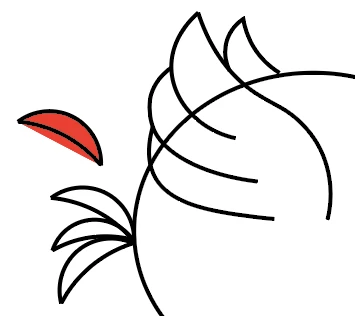
Hello, I apologize if this is a simple question but I am a beginner to Illustrator and am having some trouble with the curvature tool. I am creating a character for an app and have come across two problems I can't seem to solve.
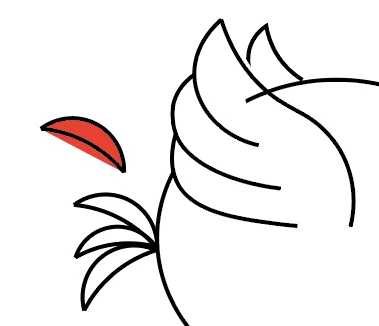
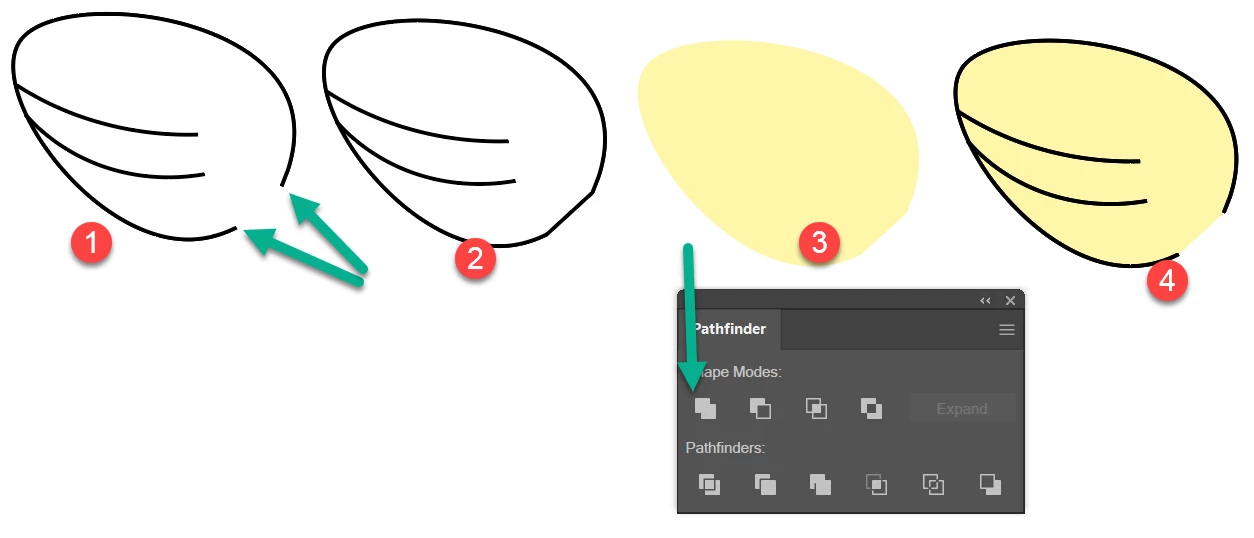
1) I made the wing using the curvature tool with stroke set to black and no fill. I want the wing to be on top of the character's body making the line of its main body hidden behind the wing. I brought the wing to the top layer and the problem still proceeds. When I apply a white fill I expected this to be solved but as you see in the second attached picture the white fill goes farther than the strokes in some places and some parts have no white fill. I don't understand why this is.
2) For the red feathers on the back I have a similar problem. I made those with the curvature tool as well, two separate curves that I grouped together and copied 3 times. But when I set fill to red the red color goes outside the curve (as you see on the additional feather i pasted and filled next to my character)
Again apologies if this is a basic fix but if anyone could help it would be much appreciated.
Matt
 AdChoices