Participant
November 8, 2020
Answered

Custom Brush with right angle (90 degree) corner problems

  • November 8, 2020
  • 3 replies
  • 1068 views

Hello,

I created a custom brush.

It works fine with round corners.

But when I draw sharp right angles, weird things happen. Unwanted bit of the brush breaks out from nowhere. See red circles below.
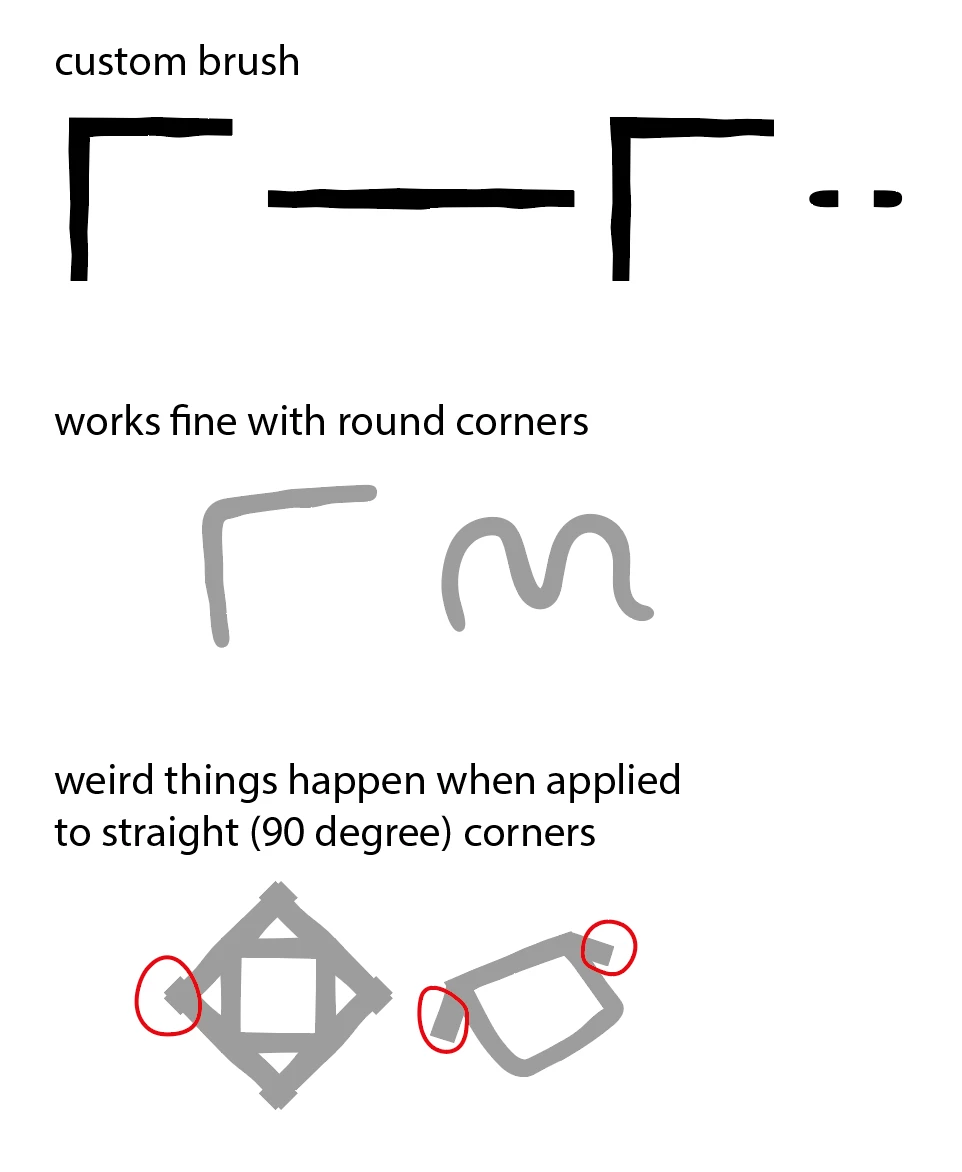
If I reduce the stroke weight it disappears. But the original brush I based it upon (and other pattern brushes that I've studied) - no matter what stroke weight is used, this problem doesn't occur. 

What am I doing wrong?


Thank you!

This topic has been closed for replies.
Correct answer Kurt Gold

The corner tiles of the pattern brush are too large to work properly with rather small object sizes and certain stroke weights.


You would have to reconstruct the pattern brush definition.


3 replies

Kurt Gold
Community Expert
Kurt GoldCommunity ExpertCorrect answer
Community Expert
November 8, 2020

The corner tiles of the pattern brush are too large to work properly with rather small object sizes and certain stroke weights.


You would have to reconstruct the pattern brush definition.


Participant
November 9, 2020

Thank you for pointing me in the right direction. I've managed to tweak it so it works better. It still needs refining but I know what to look out for now.

Kurt Gold
Community Expert
Community Expert
November 8, 2020

Unfortunately, the link you provided is not public.


Can you make it public?


Participant
November 8, 2020
Kurt Gold
Community Expert
Community Expert
November 8, 2020

Which version of Illustrator are you using?


Can you share a sample Illustrator file (.ai) with that brush?


Participant
November 8, 2020

Hello,

I'm using Illustrator CC (version 24.3).

I've temporary placed a copy of the brush in this location for sharing:

https://drive.google.com/file/d/17jFHdKhxBm_xNHyH66gI9KfxDkFotQY2/view?usp=sharing 

Thanks ~