johanssonmichael
Participant
January 14, 2018
Answered

Custom change corners of rectangle?

  • January 14, 2018
  • 1 reply
  • 234 views

How do I remove 1+2 from A and 3+4 from B so that I end up with a shape that looks like C?
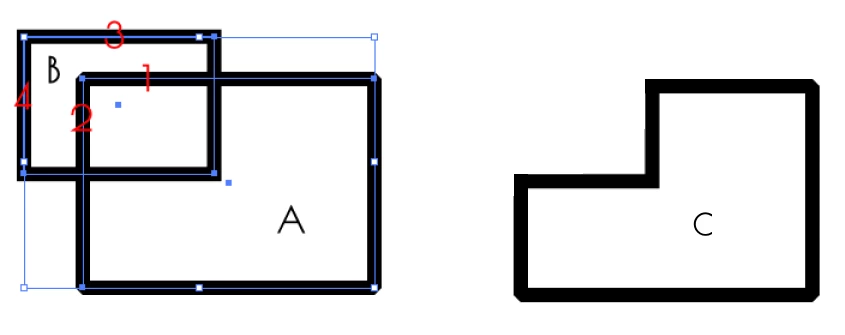
Maybe it's not possible without offering a goat while drifting around in circles on a unicycle as you're juggling burning virgins from Mars, but there should be a natural solution to this imo.

    This topic has been closed for replies.
    Correct answer Monika Gause

    Pathfinder

    Shapebuilder tool

    Live paint tool

    Shaper tool

    They all offer this possiblity. Choice of tool depends on whether you want this to be editable later or not.

    1 reply

    Monika Gause
    Community Expert
    Monika GauseCommunity ExpertCorrect answer
    Community Expert
    January 14, 2018

    Pathfinder

    Shapebuilder tool

    Live paint tool

    Shaper tool

    They all offer this possiblity. Choice of tool depends on whether you want this to be editable later or not.

    johanssonmichael
    Participant
    January 14, 2018

    That's brilliant. Pathfinder did the trick for me! Thank you.

    Monika Gause
    Community Expert
    Community Expert
    January 14, 2018

    You're welcome.

    Whenever you have time, it will be worth to take a look at the other options too as they might become handy in different situations.

    How to create and work with Live Paint groups in Illustrator

    How to create shapes using the Shape Builder tool in Illustrator

    https://helpx.adobe.com/illustrator/usin…