
Participant
October 3, 2018
Answered

Custom Constrain Angles

  • October 3, 2018
  • 3 replies
  • 4136 views

I need to draw lines every 10 degrees.
I tried to use the Smart Guides preferences, but it only let me use 10, 20, 30, 40, 50 and 60 degrees.
Tried to use the Line Tool holding Alt key for click, but then I need to specify angle AND distance. I need free distance at the specific angles.

I think AutoCAD has the tool I need. Is there any way of doing it on Ai?

Tnx a lot.
    This topic has been closed for replies.
    Correct answer Ray Yorkshire

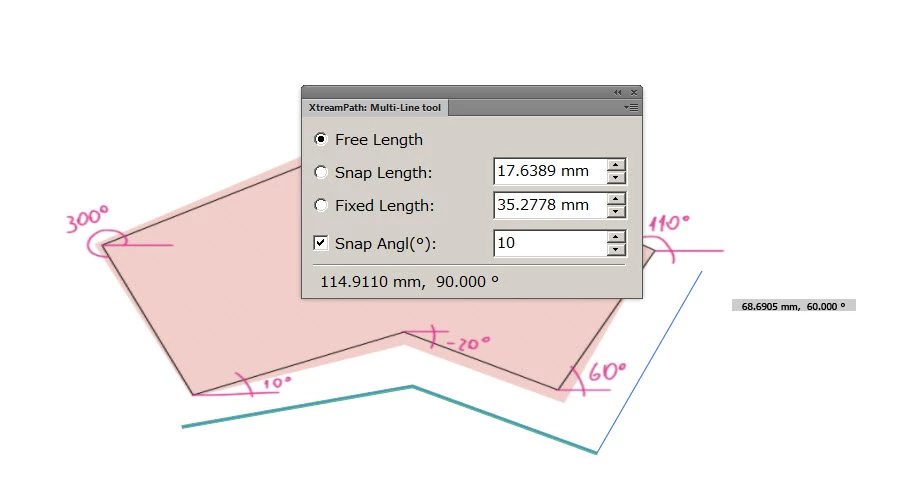
    Xtreme path plugin  by CValley has a multi line tool, you can set the snap angles, eg to 10's

    Downloads / FILTERiT and Xtream Path - Adobe Illustrator Plugin | CValley store

    Has a working trial.

    3 replies

    Ray Yorkshire
    Ray YorkshireCorrect answer
    Participating Frequently
    October 3, 2018

    Xtreme path plugin  by CValley has a multi line tool, you can set the snap angles, eg to 10's

    Downloads / FILTERiT and Xtream Path - Adobe Illustrator Plugin | CValley store

    Has a working trial.

    Bill Silbert
    Community Expert
    Community Expert
    October 3, 2018

    Have you tried using the Transform Each dialog (Object>Transform>Transform Each)?

    You can set up a series of transformations for a selected line or object—including distance and angle—and then click on Copy. It will make one copy to your specifications but if before deselecting you continuously use the keyboard shortcut Command (Mac)/Control (PC)-d then it will repeat the transform as many times as you need.

    UyacanAuthor
    Participant
    October 3, 2018

    Thank you guys!
    I think I've not explained myself good enough.
    I want to use the Pen Tool. I click for the first point. The second point need to be in a direction multiple of 10º.
    I need all the segments to be in round angles.

    I need all the black lines to be in round angles. Got it?
    But I need a quick way to do it... cause there are seeeeeveral files do correct.
    Its hard to explain. Sorry if I can't.
    Tnx for your effort.

    Monika Gause
    Community Expert
    Community Expert
    October 3, 2018

    You could take a look at the plugin InkScribe.

    Mario Arizmendi
    Legend
    October 3, 2018

    I am not sure if I undertand what you want but what if you draw a vertical line and then aply transform efect like this example?