This topic has been closed for replies.
Correct answer Mike_Gondek10189183

Sorry but you cant do that. You will to enter the individual colors into the color stops using the gradiant panel.

You can though with nothing selected go into the gradient panel, select a gradient stop, then shift eyedropper sample the color stops.
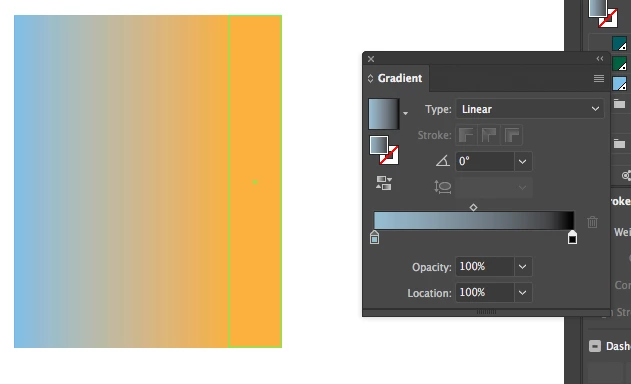
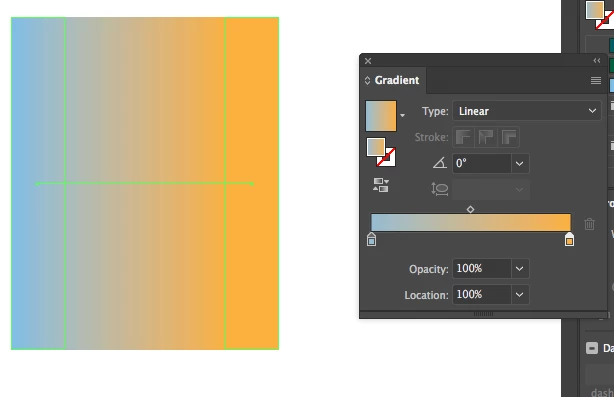
I personally did not like using shift eyedropper in the past, as that used to take the RGB color sent to the screen. Seems in CC2017 or earlier they updated this to actually picked up the PMS color I had in the sample below. You will though need to watch as for example I can convert my rectangles to CMYK, but since the orange is on top is difficult to pick up the exact blue color.

3 replies

jane-e
Community Expert
Community Expert
January 22, 2017

I personally did not like using shift eyedropper in the past, as that used to take the RGB color sent to the screen. Seems in CC2017 or earlier they updated this to actually picked up the PMS color I had in the sample below.

logos18527770

Also note that you can create your gradient out of swatches.

If you have global swatches or spot colors you can redefine the swatches and the gradients will update.

Mike_Gondek10189183
Community Expert
Community Expert
January 23, 2017

In addition is very useful is to select a gradient stop, and option click on a swatch to fill the gradient stop.

jane-e
Community Expert
Community Expert
January 23, 2017

Yes, the old ways are sometimes the best ways!

logos18527770
Participant
December 1, 2016

I found answer. there is no way to create the gradient swatch using blend tool but i found something interesting you can play with gradient swatch and blend tool . Gradient transition Using blend tool

Mike_Gondek10189183
Community Expert
Community Expert
December 1, 2016

Thanks for sharing your article. Please don't let my response hurt your feelings, but I see no advantage in your article to using blends to make standard linear or radial gradients. For creating gradients I would use the gradient window in most all instances. How to apply or edit a gradient in Illustrator .

Stating that using blends to create gradients this is the easiest way, would be readily disagreed.

Now your topic is good, and could be more successful if you showed something blends can do better, than the gradient window or gradient mesh.

In reality usage of blends to make gradients is going away though as they have added gradients on strokes, which replaces much of the usage of blends.

logos18527770
Participant
December 1, 2016

thanks. that was beneficial . .

Mike_Gondek10189183
Community Expert
Mike_Gondek10189183Community ExpertCorrect answer
Community Expert
November 30, 2016

Sorry but you cant do that. You will to enter the individual colors into the color stops using the gradiant panel.

You can though with nothing selected go into the gradient panel, select a gradient stop, then shift eyedropper sample the color stops.

I personally did not like using shift eyedropper in the past, as that used to take the RGB color sent to the screen. Seems in CC2017 or earlier they updated this to actually picked up the PMS color I had in the sample below. You will though need to watch as for example I can convert my rectangles to CMYK, but since the orange is on top is difficult to pick up the exact blue color.

logos18527770
Participant
December 1, 2016

Hello Mike Gondek2

I am glad to see your detailed answer to my query. You fix my issue. i was trying to create gradient swatch using blend tool.

thanks
