


Known Participant
October 19, 2023
質問

Custom Shortcuts not working on 28.

  • October 19, 2023
  • 返信数 4.
  • 1254 ビュー

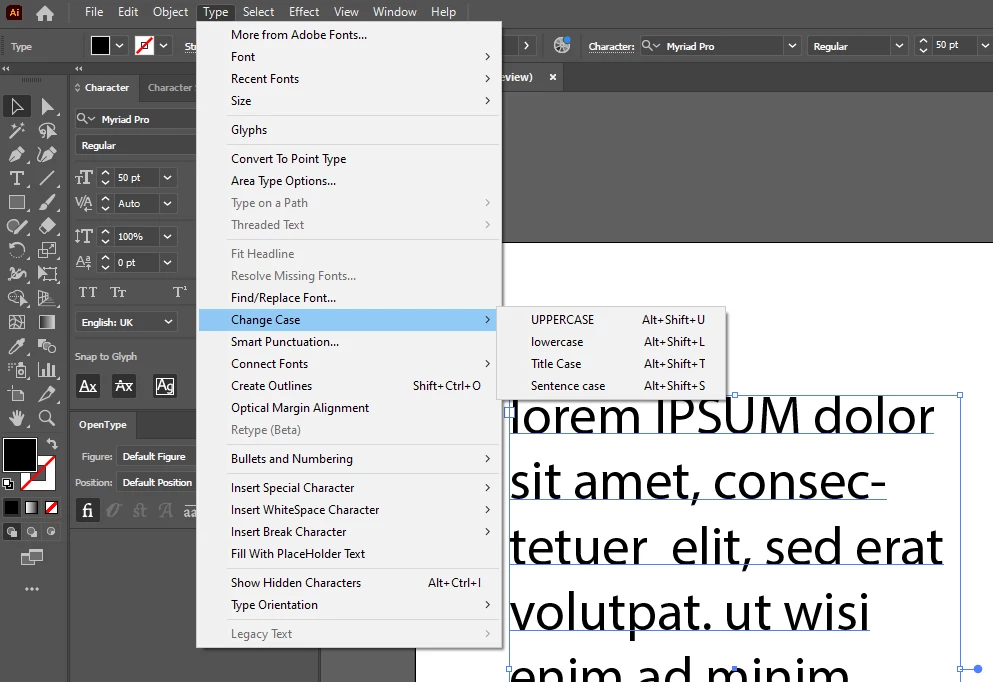
Hi - I have been using custom shortcuts for CHANGE CASE Upper/title.sentence/lower for many years, creating and saving them in new versions when required. 

They have stopped working in my up-to-date 28.0 version

- Shortcuts are saved and are showing in the Type dropdown


ALT+Shift+T = Title
ALT+Shift+S = Sentence case

ALT+Shift+U = UPPERCASE

ALT+Shift+L = lower


ALT+Shift+T now opens Type menu from top bar (never did this before)
ALT+Shift+S now opens Select menu from top bar (never did this before)

ALT+Shift+U will not work on a highlighted word, only on a selected text box

ALT+Shift+L will not work on a highlighted word, only on a selected text box


if i go the long way of TYPE > Change Case > Title Case I can change case of a selected word/words.


I have tried CTRL+ALT+SHIFT when reopening Illustrator, deleted saved shortcuts and re-adding them - nothing is resolveing this.


...help!


このトピックへの返信は締め切られました。

返信数 4

Kurt Gold
Community Expert
Community Expert
November 2, 2023

In my eyes this is just a conflict between a custom Illustrator shortcut and an age-old Windows OS accessibility key that opens menu commands when pressing the Alt key plus the character that is then displayed as underlined in each menu command.


The OS shortcut is just stronger than the Illustrator shortcut in that case.


I'm not sure if one can disable the OS behaviour. It is considered as one of the most essential accessibility features on the Windows platform.


On Windows, this makes all custom shortcuts that involve the Alt key kind of useless, doesn't it?


Egor Chistyakov
Inspiring
October 23, 2023

This feels VERY much like my problem I recently reported:
https://illustrator.uservoice.com/forums/601447/suggestions/47354918

Mike_Gondek10189183
Community Expert
Community Expert
October 19, 2023

Using Shift Option U on Mac gave me a bad result, as option U sets a ¨


I changed the key command to Shift Command U and worked fine

Similar conflicts may exist on windows so try Shift Ctrl U.


Known Participant
October 19, 2023

Hi - i have tried other combinations without any success - plus I should be able to highlight a single word, not just on the text box. I am using the same shortcuts i have used in numerous previous versions of Illustrator and also InDesign :o/

Monika Gause
Community Expert
Community Expert
October 19, 2023

Did you set up these shortcuts fresh after updating the app? Or did you import your custom shortcuts? The latter might not always work. What happens if you set up fresh shortcuts? Do they work then?

Known Participant
October 19, 2023

they were set as fresh new ones.

Monika Gause
Community Expert
Community Expert
October 19, 2023

You could check if you have a general conflict with modifier keys. This happens when other applications interfere with Illustrator. Possible candidates:

  • WebRoot
  • Apple Terminal
  • Word, Excel, Powerpoint
  • »Enable Full Keyboard« in Settings > Accessibility > Keyboard on Mac OS
  • Apple Mail, Outlook
  • Spacebar is used as a shortcut by the system
  • Chrome, Internet Explorer, Safari
  • Wacom Desktop Center, Wacom settings
  • Windows Touch Pad problem
  • LastPass, Bitwarden (password managers)
  • The VPN